


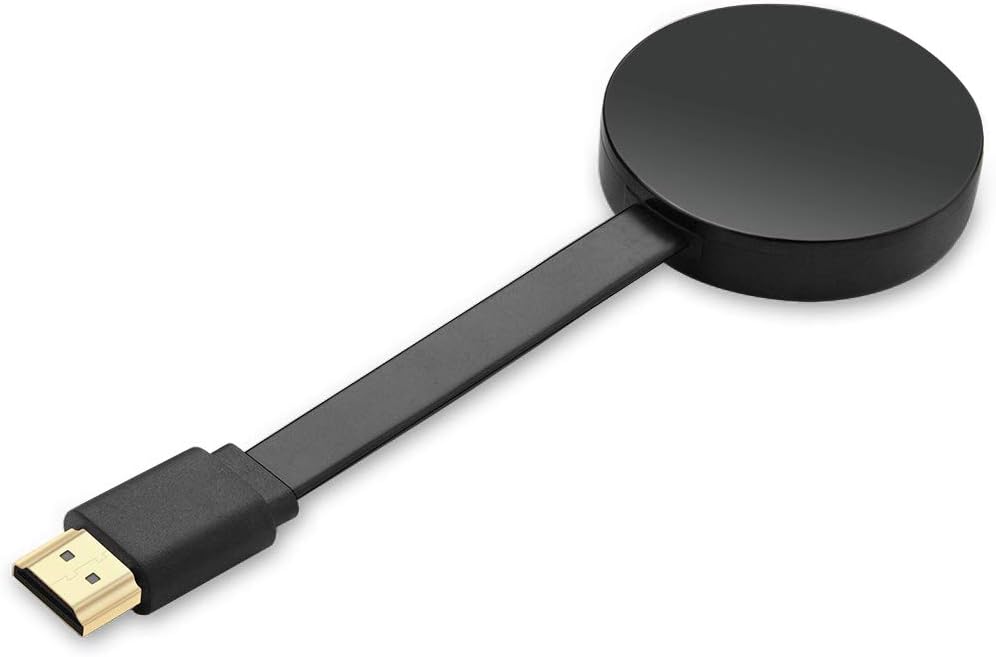

XTRONS 4K Wireless Display Adapter for TV iOS Android Screen Mirroring WiFi HDMI Dongle
₦29.89
Description
About the Product 🔑
| Feature | Details |
|---|---|
| WIDE COMPATIBILITY ✅ | Supports Airplay (iOS) and Miracast (Android). Compatible with iOS 8.0+ and Android 4.3+. 📱 |
| Screen Mirroring Adapter 🖥️ | Casts photos, videos, office files, web browser, live camera, and APPs from smartphone to large screen. 📺📽️ |
| 4K UHD OUTPUT 🎬 | Supports 4K resolution video graphic sound output for an excellent audio-visual feast. 🌟 |
| Portable Mini Size 🤏 | Pocket-size design for conferences, meetings, and entertainment. Simple and convenient. ✨ |
| XTRONS GUARANTEE 🛡️ | 3-month warranty and technical support. 🤝 |
Product Benefits 💡
- SHARE CONTENT TO BIG SCREEN WIRELESSLY ➡️📺
- Creates your own exclusive cinema at home or in your car. 🎬🏠🚗
Usage Instruction 🛠️
- Connect WiFi Antenna (micro USB head) to HDTV05. 🔌
- Plug the HDTV05 into the HDMI port of your HD monitor and switch to the right input source. HDMI➡️🖥️
- Plug the USB cable into an external USB power adapter. ⚡
- The HD monitor will show Setup page. ⚙️
For Android Devices Connection 🤖
- Find Miracast (or wireless display/smartview/screen mirroring/play to) on your Android device, and select the SSID name. ▶️📡
For iOS Devices Connection 🍎
- Open your iOS devices “camera” to scan the first QR code on the setup page. 📸<0xF0><0x9F><0xA7><0x81>
- Click “Join” when pop-up shows up. 👍
- Turn on Airplay in iOS devices and select HDTV05’s SSID. 📶
For iOS Devices Connection + DLAN 🍎📶
- Open iOS devices “camera” to scan the first QR code on the setup page. 📸<0xF0><0x9F><0xA7><0x81>
- Click “Join” when pop-ups show up. ✅
- Wait 3s till the second QR code shows, scan it and click the pop-ups. ⏱️<0xF0><0x9F><0xA7><0x81>
- Safari will be opened automatically, select your home Wi-Fi and enter password. 🌐🔑
- Turn on Airplay in iOS devices and select HDTV05’s SSID. 📶
Product Specification 📱
| Specification | Description |
|---|---|
| Brand Name 🏷️ | XTRONS |
| Item Weight ⚖️ | 3.2 ounces |
| Package Dimensions 📏 | 5.59 x 2.91 x 1.22 inches |
| Item model number 🆔 | HDTV05 |
| Color Name 🎨 | black |
| Special Features ⭐ | Portable, Wireless, Wireless Display |
| ASIN 🔢 | B07ZNJZW43 |
| Customer Reviews ⭐⭐⭐⭐ | 3.6 out of 5 stars (139 ratings) |
| Best Sellers Rank 🥇 | #53,643 in Electronics, #253 in Streaming Media Players |
| Date First Available 📅 | October 28, 2019 |
Product Details 🏷️
NOTE
- Connected HD monitor must have HDMI input function. 🔌
- The HDTV05 does NOT support Netflix, Amazon Prime videos, Hulu, Comcast TV, DIRECTV and any encrypt paid video apps, due to unauthorized sharing for third-party software. 🚫🔒
Package Includes:
- 1 x Screen Mirroring Adapter 📦
- 1 x USB Cable (with receiver) 🔌
WIDE COMPATIBILITY – The wireless display receiver supports Airplay (for iOS) and Miracast (for Android). It’s compatible with iOS 8.0+ OS and Android 4.3+ version for your smart devices.
4K UHD OUTPUT – This TV cast device supports 4K resolution video graphic sound output, providing you excellent audio-visual feast on big screen. Now you can create your own exclusive cinema at home or in your car.
PORTABLE MINI SIZE – The pocket-size design enables important business conferences, office routine meetings, and multimedia campus education in school, home theater entertainment. Simple and convenient for you.
XTRONS GUARANTEE – XTRONS provides a 3-month warranty for this item and technical support. If you still have questions about this product, please feel free to contact us.
Warranty & Support 🤝
Amazon.com Return Policy
Amazon.com Voluntary 30-Day Return Guarantee: You can return many items you have purchased within 30 days following delivery of the item to you. Our Voluntary 30-Day Return Guarantee does not affect your legal right of withdrawal in any way. You can find out more about the exceptions and conditions here. ↩️
Product Warranty: For warranty information about this product, please click here. 📃
Full Images
Product Standout Benefits
SHARE CONTENT TO BIG SCREEN WIRELESSLY – With this mirroring device, you can cast photos, videos, office files, web browsers, live cameras, and APPs from smartphones to a large screen like TV, projector and any HD monitor.
4K UHD OUTPUT – This TV cast device supports 4K resolution video graphic sound output, providing you excellent audio-visual feast on big screen. Now you can create your own exclusive cinema at home or in your car.
WIDE COMPATIBILITY – The wireless display receiver supports Airplay (for iOS) and Miracast (for Android). It’s compatible with iOS 8.0+ OS and Android 4.3+ version for your smart devices.
PORTABLE MINI SIZE – The pocket-size design enables important business conferences, office routine meetings, and multimedia campus education in school, home theater entertainment. Simple and convenient for you.
XTRONS GUARANTEE – XTRONS provides a 3-month warranty for this item and technical support. If you still have questions about this product, please feel free to contact us.
Customer Questions and Answers
How do I use this product? 🤔
For Android Devices Connection:
- Connect WiFi Antenna (micro USB head) to HDTV05.
- Plug the HDTV05 into the HDMI port of your HD monitor and switch to the right input source.
- Plug the USB cable into an external USB power adapter.
- The HD monitor will show Setup page.
- Find Miracast (or wireless display/smartview/screen mirroring/play to) on your Android device, and select the SSID name.
For iOS Devices Connection:
- Connect WiFi Antenna (micro USB head) to HDTV05.
- Plug the HDTV05 into the HDMI port of your HD monitor and switch to the right input source.
- Plug the USB cable into an external USB power adapter.
- The HD monitor will show Setup page.
- Open your iOS devices “camera” to scan the first QR code on the setup page.
- Click “Join” when pop-up shows up.
- Turn on Airplay in iOS devices and select HDTV05’s SSID (it is on the setup info).
For iOS Devices Connection + DLAN:
- Connect WiFi Antenna (micro USB head) to HDTV05.
- Plug the HDTV05 into the HDMI port of your HD monitor and switch to the right input source.
- Plug the USB cable into an external USB power adapter.
- The HD monitor will show the Setup page.
- Open iOS devices “camera” to scan the first QR code on the setup page.
- Click “Join” when pop-ups show up.
- Wait 3s till the second QR code shows, scan it and click the pop-ups
- Safari will be opened automatically, select your home Wi-Fi and enter password (Not SSID on the monitor, but the Wi-Fi you usually use)
- Turn on Airplay in iOS devices and select HDTV05’s SSID (it is on the setup info)
Is it good for watching paid video apps like Netflix? 🌿
This HDTV05 does NOT support Netflix, Amazon Prime videos, Hulu, Comcast TV, DIRECTV and any encrypt paid video apps, due to unauthorized sharing for third-party software.
How big is this device? 📏
It’s a portable mini size, pocket-size design!
What’s the warranty on this product? 🔄
XTRONS provides a 3-month warranty for this item and technical support.
Related Products
-

Apple TV 4K 3rd Gen 128GB Wi-Fi Ethernet with Siri Remote & 1 Year Warranty
₦199.99 -
SmartSee 4K/1080P Wireless Display Adapter for Phone Laptop to TV Projector, Dual Core Streaming Device
₦25.99 -

iShare iOS Wireless HDMI Display Adapter Mirroring iPhone to TV HD Video Audio Sync YouTube TikTok
₦32.49 -

SmartSee 1080P HD Wireless WiFi Display Adapter for iPhone, iPad, Android, Windows to HDTV/Monitor
₦24.99 -

iPhone Wireless HDMI Display Adapter for TV/Projector, HD Video/Audio Sync, iOS Mirroring (No Netflix)
₦29.99 -

4K Wireless HDMI Display Dongle Adapter for Seamless Streaming Media Audio Video from Laptop PC Smartphone to HDTV Projector Monitor
₦59.99 -

Portable Wireless HDMI Display Dongle Adapter Stream Media from Smartphone Laptop to HDTV
₦85.99 -

Wireless HDMI Streaming Adapter for Phones Tablets PCs to HDTV Projector
₦35.99 -
Charcoal Black Wireless Screen Mirroring Adapter for iOS Android Laptops to HDTV Projector
₦26.99 -

4K HD Wireless Display Adapter Stream iPhone/Tablet/Laptop to TV Projector Monitor
₦29.99 -

4K Wireless HDMI Display Dongle Adapter No Delay Screen Mirroring for iOS Android Windows Mac to HDTV Monitor Projector
₦39.88 -

4K Wireless HDMI Display Adapter Miracast Dongle Plug and Play 5.8G for Smartphone PC to TV
₦47.97 -

Raxxio RAX2100 Android 9.0 4K HDR Smart TV Box 64GB ROM, 4GB RAM
₦85.99 -

4K Wireless HDMI Display Adapter for Phone Tablet Laptop to HDTV, 1080P WiFi Streaming Receiver
₦29.99 -

Unitek 4K Wireless HDMI Display Dongle Adapter Screen Mirroring Receiver 2.4G/5G for iOS Android Windows
₦49.99 -

4K 5G HDMI Wireless Display Dongle Adapter Screen Mirroring for iPhone iPad Android Laptop to HDTV
₦39.99 -

Anycast 1080P HDTV Wireless Display Adapter for Mobile Screen Mirroring on TV/Projector, Supports Android, Mac, iOS, Windows
₦19.99 -

4K HD Wireless HDMI Display Dongle Adapter Plug and Play No App for Laptop PC Smartphone HDTV Projector
₦24.99 -

4K Wireless HD Display Adapter Mirror Cast Dongle Receiver for iOS Android Mac Windows to TV Projector Monitor
₦36.99 -

Android 13 TV Box 4GB 64GB 8K HDR10 WiFi 5 Voice Remote
₦49.99
Reviews
There are no reviews yet.