
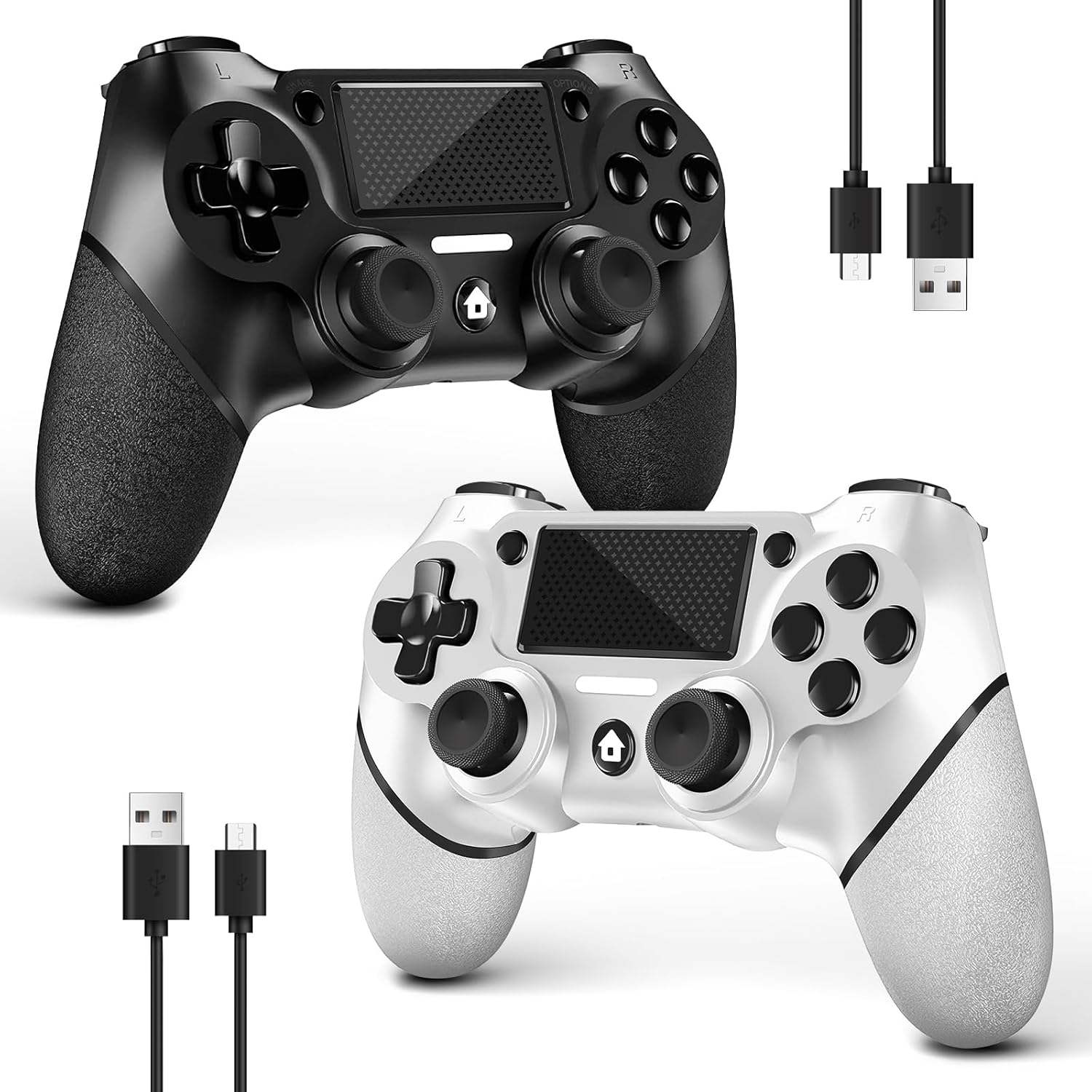


AceGamer DualShock Wireless Controller Twin Pack for PS4 Pro Slim PC Black White Non-Slip Grip
₦14.99
Description
About the Product 🔑
| Feature ✨ | Details 📝 |
|---|---|
| ✅ Compatibility 🎮 | AceGamer wireless controller compatible with PS4/Pro/Slim/Windows PC. |
| 📦 Pack Quantity 🔢 | 2-Pack controllers. |
| 💰 Value Proposition 💲 | Exceptional value, premium gaming performance, keeps budget intact. |
| 🤲 Grip Design 🖐️ | Non-Slip Grip of Both Sides. |
| 🔌 Included Accessories 💡 | 2 USB-C Cables. |
| 💡 Dual Packing Advantage 🚀 | Two controllers packaged in one box, less costly than buying separately. Get two different custom designed controllers at the same time, very cost-effective. This will bring you a better game experience when you play with your friends, lover, family. |
| ❗ Initial Connection Attention ⚠️ | Only when connecting for the first time, you must activate the device with the USB cable for the first pairing and connection. |
| ❗ PC Connection Note 💻 | Connecting to PC (without Bluetooth) needs to install receiver, not included. |
| 🎯 Function Highlights 🌟 | 360° Refined analog sticks without dead zone, new touchpad on the face offer players precise control. Controller which built-in 6-axis gyro sensor has dual motor vibration, excellent dual shock effect design makes the tactile sense more sensitive. Optimized buttons and triggers, ergonomic design non-slip grips, offer fantastic gaming experience. |
| ⚙️ Turbo Setting ⚡ | You can customize any key as a turbo key. First, hold down the ‘share’ key, then click the turbo key you want to set up successfully. Secondly, you can adjust the turbo frequency. First, hold down the ‘share’ key, then touch the joystick on the right up and down. There are three gears to adjust in total. |
| 🏆 What You Get 🎁 | 2x AceGamer for ps4 controllers wireless; 2x Charging Cable; 2x User Manual; Professional after-sales service. We focus on the design, production and sales of custom controllers. |
Usage Instruction 🛠️
Step 1: 🔌 Activate the device with the USB cable for the first pairing and connection.
Step 2: 📶 After the first connection, normal wireless connection of Bluetooth can be made; the USB data cable is no longer needed.
Step 3: ⚙️ Customize any key as a turbo key: hold down the ‘share’ key, then click the turbo key.
Step 4: 🎛️ Adjust turbo frequency: hold down the ‘share’ key, then touch the joystick on the right up and down (three gears to adjust).
Step 5: 💻 For PC connection without Bluetooth, install a receiver (not included).
Product Specification 📱
| Specification Name ⚙️ | Description 📝 |
|---|---|
| Compatibility 🎮 | PS4/Pro/Slim/Windows PC |
| Pack Quantity 🔢 | 2 Controllers |
| Grip 🖐️ | Non-Slip |
| Cables Included 🔌 | 2 USB-C |
| Analog Sticks 🕹️ | 360° Refined |
| Touchpad ✨ | Yes |
| Gyro Sensor 🧭 | 6-Axis |
| Vibration ⚡ | Dual Motor |
| Weight ⚖️ | 1.59 pounds |
| Manufacturer 🏭 | AceGamer |
| Batteries 🔋 | 1 Lithium Ion (included) |
| Package Dimensions 📏 | 6.57 x 5.51 x 4.61 inches |
Product Details 🏷️
AceGamer 2 Pack for PS4 Controller, Wireless Controller for PS4/Pro/Slim/PC, with Non-Slip Grip of Both Sides and 2 USB-C Cable! (Black and White)
- ASIN: B0D92B8QLG
- Customer Reviews: 4.3 out of 5 stars 5,409 ratings
- Best Sellers Rank: #164 in Video Games, #2 in PlayStation 4 Gamepads & Standard Controllers
- Package Dimensions: 6.57 x 5.51 x 4.61 inches; 1.59 Pounds
- Type of item: Video Game
- Item Weight: 1.59 pounds
- Manufacturer: AceGamer
- Batteries: 1 Lithium Ion batteries required. (included)
- Date First Available: July 8, 2024
Warranty & Support 🛡️
Product Warranty: For warranty information about this product, please click here


Full Images


Product Standout Benefits
Enjoy a superior gaming experience with these specially designed wireless controllers. You’ll get two custom-designed controllers in one box, making it a more cost-effective way to enhance your gameplay, especially when playing with friends, loved ones, or family.
Wide Compatibility & Easy Setup
- AceGamer wireless controllers are compatible with PS4/Pro/Slim and Windows PC.
- For the first connection, you’ll need to activate the device with the USB cable for pairing.
- After the initial pairing, you can enjoy a normal wireless Bluetooth connection without needing the USB cable.
- If connecting to a PC without Bluetooth, a receiver (not included) is required.
Enhanced Functionality
- Features 360° refined analog sticks with no dead zone for precise control.
- A new touch pad on the face of the controller offers players even more accuracy.
- Built-in 6-axis gyro sensor and dual motor vibration provide an excellent dual shock effect, making tactile feedback more sensitive.
- Optimized buttons and triggers, along with ergonomic, non-slip grips, ensure a fantastic gaming experience.
Customizable Turbo Setting
- You can customize any key as a turbo key by holding down the ‘share’ key and then clicking the desired turbo key.
- Adjust the turbo frequency by holding down the ‘share’ key and touching the right joystick up or down. There are three gears to choose from.
What’s Included?
- 2x AceGamer wireless PS4 controllers
- 2x Charging Cable
- 2x User Manual
- Professional after-sales service
Customer Questions and Answers
Q: How do I connect these controllers? 🤔
For the first connection to your P4, you’ll need to use the included USB cable for pairing with the console. Once that’s done, you can connect wirelessly! Just press and hold the “HOME” and “SHARE” buttons for 3-5 seconds. Then, on your console’s Bluetooth devices, you should see ‘Wireless Controller’. Click on it to pair. You can check out our video for a detailed walkthrough!
Q: Are these controllers good for playing with friends? 🤝
Absolutely! These controllers come in a pack of two, which is super cost-effective if you want to get two custom-designed controllers at once. It’s perfect for bringing your friends, lover, or family into the game for a better experience!
Q: Can I customize the buttons? ⚙️
You sure can! You have the option to set any key as a turbo key. Just hold down the ‘share’ button and then click the button you want to set up as turbo. Plus, you can even adjust the turbo speed by holding the ‘share’ button and moving the right joystick up or down—there are three speeds to pick from!
Q: What if I’m connecting to a PC? 💻
Great question! These controllers are compatible with Windows PC. If your PC doesn’t have Bluetooth, you’ll need a receiver (which isn’t included) to connect them. But if your PC has Bluetooth, after the initial USB cable pairing, you’re good to go wirelessly!
Q: What comes in the box? 🎁
You’ll get everything you need to start playing! Inside, you’ll find 2 AceGamer wireless PS4 controllers, 2 charging cables, and 2 user manuals. Plus, you get our professional after-sales service, so we’re here if you have any questions.
Related Products
-
Sale!

Mafia Trilogy Standard Edition for PlayStation 4
Original price was: ₦59,985.00.₦54,369.00Current price is: ₦54,369.00. -

Eco-Friendly 500GB PS4 Gaming Console with Controller – Slim Portable Design, Fast Delivery
₦553,869.00 -
Sale!

Batman Arkham Collection Standard Edition for PlayStation 4
Original price was: ₦37,485.00.₦32,610.00Current price is: ₦32,610.00. -

Rechargeable Wireless PS4 Game Controller with Dual Shock and Adjustable LED Lights Black+White
₦99,960.00 -
Sale!

PlayStation Heavy Rain and Beyond Two Souls Double Pack PS4
Original price was: ₦44,985.00.₦40,485.00Current price is: ₦40,485.00. -

Puning Wireless PS4 Controller Remote for Playstation 4 Slim Pro 128GB
₦16.99 -
Flame Red Wireless Controller for PS4/Pro/Slim and PC with Touchpad, Headphone Jack, Motion Control
₦19.99 -

Dualshock 4 Camouflage Silicone Controller Skin Set for PS4/slim/Pro Red Blue with 8 Pro Thumb Grips
₦13.99 -

SZYUYU Wireless Controller for PS4 Slim Pro PC Black Skull 3.5mm Audio Jack Six Axis
₦19.99 -

Pink Silicone Controller Skin Protector Set for PS4 Slim Pro with 8 Thumb Grips Camouflage White
₦12.99 -
MOOGOLE PS4 Wireless Controller Colorful Arrows 1000mAh Battery USB C
₦19.98 -

Officially Licensed DC Comics Harley Quinn Rebirth Legacy Color Variant Art Gaming Skin for PS4 Controller
₦15.99 -
DIANVEN Wired PS4 Controller for Playstation 4/Pro/Slim and PC Windows with Dual Vibration
₦19.97 -

Uncharted The Nathan Drake Collection for PlayStation 4 3 Game Bundle
₦34,500.00 -

GameSir Super Nova Wireless Controller Blue, 1000Hz Polling, Hall Effect Sticks, RGB, 1000mAh Battery
₦89,980.00 -
Sale!

Just Cause 3 Gold Edition for PlayStation 4 – Used Condition
Original price was: ₦34,500.00.₦19,155.00Current price is: ₦19,155.00. -

Yellow Wireless PS4 Game Controller Replacement for Playstation 4 Pro Slim PC Dual Vibration Motion Control
₦13.99 -
Sale!

God of War Remastered Hits Collection for PlayStation 4
Original price was: ₦24,674,000.00.₦15,184.00Current price is: ₦15,184.00. -

2 Pack Wireless PS4 Controllers for PS4 Slim Pro PC with Double Shock 6-Axis Motion Sensor and Headphone Jack
₦35.00 -
Sale!

The Order 1886 PlayStation 4 Game, New Condition
Original price was: ₦59,985.00.₦44,700.00Current price is: ₦44,700.00.
Reviews
There are no reviews yet.