
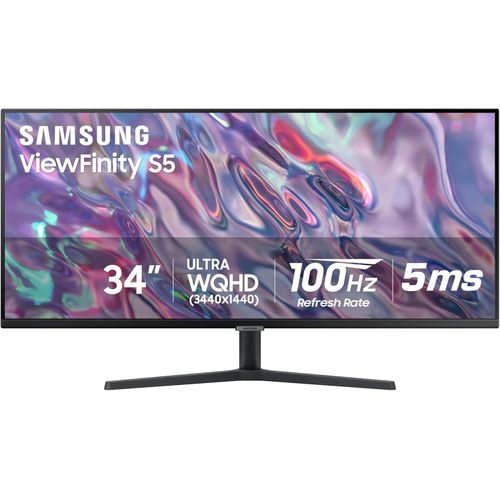
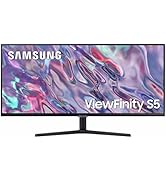
ViewFinity S50GC 34-inch Ultra-WQHD 100Hz HDR10 AMD FreeSync Monitor
₦893,660.00
DO MORE ON ONE SCREEN: See every detail on the wider display featuring a 21:9 aspect ratio; Ultra WQHD provides the simplest way to maximize screen real estate and experience truly seamless multitasking on just one screen.Brightness (Typical) : 300 cd/㎡. Static Contrast Ratio 3000:1.ENJOY A BILLION COLORS W/ INCREDIBLE DEPTH: With HDR10 that displays
Description
About the Product 🔑
| Product Name 🏷️ | ViewFinity S50GC 34″ Ultra-WQHD Monitor 🌟 |
| Display Size 🖥️ | 34 inches |
| Resolution 🖼️ | Ultra-WQHD (3440×1440) |
| Aspect Ratio 📏 | 21:9 |
| Refresh Rate ⚡ | 100Hz |
| Adaptive Sync 🤝 | AMD FreeSync™ |
| Color Depth 🌈 | Over 1 billion colors (HDR10) |
| Brightness 💡 | 300 cd/㎡ (Typical) |
| Contrast Ratio 🎛️ | 3000:1 (Static) |
| Eye Care Features 👁️ | TUV-certified Intelligent Eye Care, Ambient Light Sensor, Eye Saver Mode, Flicker Free |
| Design ✨ | Borderless, virtually bezel-free |
| Connectivity 🔌 | 2 x HDMI 2.2, 1 x DisplayPort 1.2 |
| Multitasking Features 👯 | Picture-by-Picture (PBP), Picture-in-Picture (PIP) |
Product Benefits 💡
- Wider workspace with a 21:9 aspect ratio for seamless multitasking.
- Lifelike detail with Ultra-WQHD resolution.
- Ultra-smooth user experience with AMD FreeSync™ and 100Hz refresh rate.
- Avoids eyestrain with TUV-certified Intelligent Eye Care that automatically adjusts brightness.
- Experience content as the creator intended with HDR10 displaying over 1 billion colors.
- Keeps the refresh rate of your monitor and graphics card in sync to reduce image tearing for a superfluid entertainment experience.
- Watch movies and play games without interruptions.
- Review 2 projects or run 2 programs simultaneously with PBP.
- Work on 1 task while monitoring another with PIP.
- Minimal bezel brings maximum concentration.
- See more at once with no distractions in a dual monitor setup.
Usage Instruction 🧾
- Step 1: 🔌 Connect the monitor to your PC using the included HDMI or DisplayPort cable.
- Step 2: 💡 Press the power button to turn on the monitor.
- Step 3: ⚙️ Adjust settings like brightness, contrast, and refresh rate via the on-screen display menu to your preference.
- Step 4: 👯 For multitasking, explore PBP or PIP features through the monitor’s menu.
Product Specification 📱
| Specification | Description |
| Display Size 🖥️ | 34 inches |
| Resolution 🖼️ | Ultra-WQHD (3440×1440) |
| Aspect Ratio 📏 | 21:9 |
| Refresh Rate ⚡ | 100Hz |
| Adaptive Sync 🤝 | AMD FreeSync™ |
| Color Support 🌈 | HDR10, Over 1 Billion Colors |
| Brightness 💡 | 300 cd/㎡ (Typical) |
| Contrast Ratio 🎛️ | 3000:1 (Static) |
| Eye Care Features 👁️ | Intelligent Eye Care, Ambient Light Sensor, Eye Saver Mode, Flicker Free |
| Design ✨ | Borderless, Minimal Bezel |
| Connectivity 🔌 | 2 x HDMI 2.2, 1 x DisplayPort 1.2 |
| Multitasking 👯 | PBP, PIP |
Product Details 🏷️
DO MORE ON ONE SCREEN:
See every detail on the wider display featuring a 21:9 aspect ratio; Ultra WQHD provides the simplest way to maximize screen real estate and experience truly seamless multitasking on just one screen.
Brightness (Typical) : 300 cd/㎡. Static Contrast Ratio 3000:1.
ENJOY A BILLION COLORS W/ INCREDIBLE DEPTH:
With HDR10 that displays over 1 billion colors compared to 16.7 million for typical SDR technology, dark colors are darker and the brightest are even brighter; Content is experienced as the creator intended
CARE FOR YOUR EYES DAY and NIGHT:
An ambient light sensor on the monitor detects lighting in your workstation and automatically adjusts brightness; Eye Saver Mode minimizes excessive blue light, and Flicker Free relieves eye strain
SEE CONTENT SMOOTHER, EVEN GAMING:
A faster than average refresh rate updates the image on screen more often every second; 100Hz refresh rate reduces lag and motion blur when playing games, watching videos, or working on design projects
STAY IN SYNC WITH THE ACTION:
AMD Radeon FreeSync keeps the refresh rate of your monitor and graphics card in sync to reduce image tearing for a superfluid entertainment experience; Watch movies and play games without interruptions
2 x HDMI 2.2 INPUTS plus 1 x DISPLAYPORT 1.2 INPUTS:
With PBP, view input from 2 simultaneous sources at native resolution, so you can review 2 projects or run 2 programs; Use PIP to resize a 2nd source and work on 1 task while monitoring another
EXPAND YOUR VIEW, ENHANCE YOUR FOCUS:
Minimal bezel brings maximum concentration; The virtually bezel free screen shows you the full picture and looks almost gapless when used in a dual monitor setup so you can see more at once with no distractions
Full Images




Product Standout Benefits
DO MORE ON ONE SCREEN: See every detail on the wider display featuring a 21:9 aspect ratio; Ultra WQHD provides the simplest way to maximize screen real estate and experience truly seamless multitasking on just one screen.
- Brightness (Typical) : 300 cd/㎡.
- Static Contrast Ratio 3000:1.
ENJOY A BILLION COLORS W/ INCREDIBLE DEPTH: With HDR10 that displays over 1 billion colors compared to 16.7 million for typical SDR technology, dark colors are darker and the brightest are even brighter; Content is experienced as the creator intended
CARE FOR YOUR EYES DAY and NIGHT: An ambient light sensor on the monitor detects lighting in your workstation and automatically adjusts brightness; Eye Saver Mode minimizes excessive blue light, and Flicker Free relieves eye strain
SEE CONTENT SMOOTHER, EVEN GAMING: A faster than average refresh rate updates the image on screen more often every second; 100Hz refresh rate reduces lag and motion blur when playing games, watching videos, or working on design projects
STAY IN SYNC WITH THE ACTION: AMD Radeon FreeSync keeps the refresh rate of your monitor and graphics card in sync to reduce image tearing for a superfluid entertainment experience; Watch movies and play games without interruptions
EXPAND YOUR VIEW, ENHANCE YOUR FOCUS: Minimal bezel brings maximum concentration; The virtually bezel free screen shows you the full picture and looks almost gapless when used in a dual monitor setup so you can see more at once with no distractions
Customer Questions and Answers
Q: How do I get more done with this monitor? 🤔
A: This monitor gives you more screen real estate with a 21:9 aspect ratio and Ultra WQHD resolution. It’s a super simple way to multitask on just one screen and see every detail!
Q: Will the colors look amazing? 🌟
A: Absolutely! It comes with HDR10, which shows over 1 billion colors, making dark colors darker and bright colors even brighter. So, you’ll see content just as the creator intended!
Q: Is it easy on my eyes? 👁️
A: Yes! It has an ambient light sensor that automatically adjusts brightness based on your room’s lighting. Plus, Eye Saver Mode cuts down on blue light, and Flicker Free technology helps relieve eye strain.
Q: Will my games and videos look smooth? ▶️
A: Totally! It has a 100Hz refresh rate, which is faster than average, meaning the image updates more often. This means less lag and motion blur when you’re gaming, watching videos, or working on design projects.
Q: Can I connect multiple devices easily? 🔌
A: For sure! It has 2 x HDMI 2.2 inputs and 1 x DisplayPort 1.2 input. With PBP, you can see input from two sources at once, and with PIP, you can resize a second source to monitor another task while you work.
Related Products
-

Series 5 27-Inch FHD Monitor with Integrated Speakers – 527sa – Refurbished
₦432,780.00 -
27 Inch Full HD LED Monitor 16:9 Aspect Ratio
₦427,480.00 -

27 Inch Series 5 FHD Monitor with Built-in Speakers – 527sa
₦340,200.00 -

Alienware AW3225QF 32-Inch 4K UHD Curved Gaming Monitor 1700R
₦3,200,235.00 -

24.5-inch Full HD 240Hz 0.5ms Gaming Monitor with 25g3zm/bk Model
₦417,320.00 -

ThinkVision T24t-20 23.8 Inch Full HD Touchscreen Monitor
₦647,580.00 -

Odyssey AG320 24 Inch Full HD Black Gaming Monitor 165Hz 1ms
₦199.08 -

27 Inch Full HD 1080p LED Monitor
₦510,120.00 -

SE2222H 21.5 Inch Full HD VA Black Monitor
₦219,940.00 -

55 Inch Samsung Odyssey Ark G97NC 4K UHD 165Hz Gaming Monitor LS55CG970NUXEN
₦3,453,634.00 -

27 Inch M70C UHD Smart Monitor White with USB-C Speakers and Remote Included
₦270.76 -

57 Inch Odyssey Neo G9 G95NC Dual UHD 240Hz Curved Gaming Monitor
₦3,296,652.00 -
24 Inch UltraGear FHD 180Hz Gaming Monitor 1ms MBR HDR10
₦285,460.00 -

55-inch Curved 4K UHD Smart Gaming Monitor – Refurbished
₦3,453,634.00 -

32 Inch UJ59 Series 4K UHD Computer Monitor VA Panel 3840×2160 Resolution
₦674,720.00 -

57 Inch Odyssey Neo G9 G95NC Dual UHD Curved Gaming Monitor
₦3,296,652.00 -

34 Inch ViewFinity S65VC Series Ultrawide QHD Curved Monitor
₦933,700.00 -

P24v G5 24 Inch Full HD 16:9 Black LCD Monitor
₦278,580.00 -

ViewFinity S65VC Series 34 Inch Ultrawide QHD Curved Monitor
₦933,700.00 -

Legion R24e 23.8 Inch Full HD Gaming Monitor 180Hz 0.5ms Response
₦314,980.00