
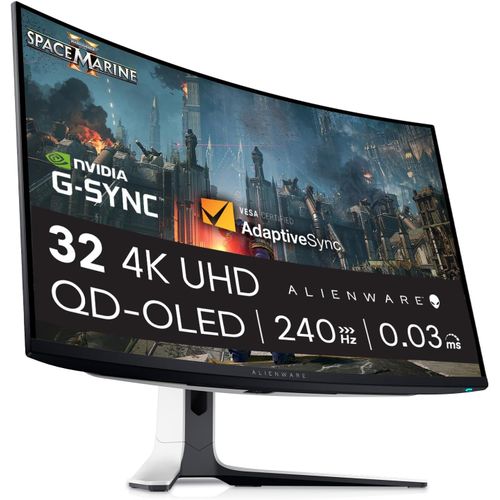

Alienware AW3225QF 32-Inch 4K UHD Curved Gaming Monitor 1700R
₦3,200,235.00
Tech Specs Technical Information Diagonal Viewing Size 31.6″ Preset Display Area (H x V) 699.48 mm x 394.73 mm 27.54″ x 15.54″ 276, .74 mm2 (427.97 inches2) Panel Type QD OLED Display Screen Coating Anti-reflection Maximum Preset Resolution 4K UHD 3840 x 2160 at 240 Hz (DSC enabled and visually lossless) Viewing Angle 178° vertical
Description
About the Product 🔑
| Feature ✨ | Details 📝 |
|---|---|
| Monitor Size 📏 | 32-inch Curved QD-OLED 🌈 |
| Resolution 🌟 | 4K UHD 3840 x 2160 📺 |
| Refresh Rate ⚡ | 240 Hz 💨 |
| Adaptive-Sync ✅ | NVIDIA G-SYNC Compatible & VESA AdaptiveSync Certified 🤝 |
| HDR Support 🌈 | HDR10, Dolby Vision 🌟 |
| Color Gamut 🎨 | DCI-P3 99% 💯 |
| Color Support 🌈 | 1.07 Billion colors 🌟 |
| Response Time ⏱️ | 0.03ms (gray-to-gray min.) 🚀 |
| Panel Type 🌟 | QD OLED ✨ |
| Screen Coating 🛡️ | Anti-reflection 🌟 |
| Pixel Pitch 📏 | 0.1814 mm x 0.1814 mm 🔬 |
| Pixel Per Inch (PPI) 📈 | 140 📊 |
| Contrast Ratio 🌌 | 1 million: 1 (SDR & HDR) 🌠 |
| Aspect Ratio 📏 | 16:9 🎬 |
| Backlight Technology💡 | OLED ✨ |
| Brightness 🌟 | 1000 cd/m2 (typical, HDR peak) 💡 |
| Connectivity 🔌 | DP 1.4, HDMI 2.1 (eARC), USB 3.2 Gen 1 (Type-A & Type-C) 🔗 |
| Built-in Speaker 🔊 | No 🚫 |
| Adjustability ⚙️ | Height, Tilt, Swivel ⬆️↔️🔄 |
| Height Adjustable Stand ⬆️ | 110 mm 📏 |
| Tilt Angle ↗️↘️ | -5°/+21° 📐 |
| Swivel Angle ↩️↪️ | -20°/+20° ↔️ |
| Low Blue Light 💡 | Yes, ComfortView Plus (Hardware solution) ✅ |
| Flicker-free ✨ | Yes ✅ |
| VESA Mount 🖼️ | 100 mm x 100 mm 🛠️ |
| Operating Temperature 🌡️ | 0° to 40°C ☀️ |
| Operating Humidity 💧 | 10% to 80% (non-condensing) 🌫️ |
| Operating Altitude ⛰️ | 5,000 m (16,404 ft) max ☁️ |
| Voltage Required ⚡ | 100 VAC to 240 VAC/50 Hz or 60 Hz + 3 Hz/3 A (typical) 🔋 |
| Power Consumption (Off) 🔌 | 0.3 W 📉 |
| Power Consumption (Standby) 🔌 | 0.5 W 💤 |
| Power Consumption (On) 🔌 | 42.5 W 💡 |
| Power Consumption (Max) 🔌 | 190.0 W 💥 |
| Included Cables 🔗 | Power, HDMI 2.1, DisplayPort 1.4, USB 3.2 Gen 1 🔌🗄️ |
Product Benefits 💡
| Benefit ✨ | Description 📝 |
|---|---|
| Immersive Gaming 🎮 | 32-inch curved QD-OLED panel for a captivating experience. 🌈 |
| Fluid Motion 💨 | 240Hz refresh rate ensures smooth gameplay. ✨ |
| Stunning Visuals 🤩 | 4K UHD resolution and HDR10, Dolby Vision support. 📺🌟 |
| Vibrant Colors 🎨 | Wide gamut color (DCI-P3 99%) for true-to-life visuals. 💯 |
| Adaptive Sync Technology 🤝 | NVIDIA G-SYNC Compatible and VESA AdaptiveSync Certified. ✅ |
| Quick Response 🚀 | 0.03ms response time for blur-free action. ⏱️ |
Usage Instruction 🛠️
Step 1: 🔌 Connect the power cable.
Step 2: 🔗 Connect your display source via DisplayPort or HDMI.
Step 3: 💡 Press the power button to turn on the monitor.
Step 4: ⚙️ Adjust settings using the on-screen display (OSD) menu.
Step 5: 🖱️ Connect USB devices to the downstream ports.
Product Specification 📱
| Specification Name 🏷️ | Description 📝 |
|---|---|
| Diagonal Viewing Size 📏 | 31.6″ 🖥️ |
| Preset Display Area (H x V) 📐 | 699.48 mm x 394.73 mm 📏 |
| Panel Type 🌟 | QD OLED ✨ |
| Display Screen Coating 🛡️ | Anti-reflection 🌟 |
| Maximum Preset Resolution 📺 | 4K UHD 3840 x 2160 at 240 Hz (DSC enabled and visually lossless) 🌟 |
| Viewing Angle 👁️ | 178° vertical / 178° horizontal ↔️ |
| Pixel Pitch 📏 | 0.1814 mm x 0.1814 mm 🔬 |
| Pixel Per Inch (PPI) 📈 | 140 📊 |
| Contrast Ratio 🌌 | 1 million: 1 at SDR and HDR 🌠 |
| Aspect Ratio 📏 | 16:9 🎬 |
| Backlight Technology💡 | OLED ✨ |
| Brightness 🌟 | 1000 cd/m2 (typical)(HDR peak) 💡 |
| Response Time (typical) ⏱️ | 0.03ms (gray-to-gray min.) 🚀 |
| Connectivity 🔌 | 1x DP 1.4, 2x HDMI 2.1 (eARC), 1x USB-B, 3x USB-A, 1x USB-C 🔗 |
| Adaptive-Sync Technology 🤝 | NVIDIA G-SYNC Compatible, VESA AdaptiveSync Certified ✅ |
| Lighting ✨ | AlienFX Lighting 🌟 |
| Adjustability ⚙️ | Height, Tilt, Swivel ⬆️↔️🔄 |
| Height adjustable stand ⬆️ | 110 mm 📏 |
| Tilt Angle ↗️↘️ | -5°/+21° 📐 |
| Swivel Angle ↩️↪️ | -20°/+20° ↔️ |
| Pivot 🔄 | N/A 🚫 |
| Dell Display Manager Compatibility ✅ | Yes 💻 |
| Low Blue Light 💡 | Yes, ComfortView Plus (Hardware solution) ✅ |
| Flicker-free ✨ | Yes ✅ |
| Color Gamut (typical) 🎨 | DCI-P3 99% 🌈 |
| Color Support 🌈 | 1.07 Billion colors 🌟 |
| Compliant Standards 📜 | Product Safety, EMC and Environmental Datasheets 🌍 |
| Flat Panel Mount Interface 🖼️ | VESA (100 mm x 100 mm) 🛠️ |
| Temperature Range 🌡️ | Operating: 0° to 40°C; Non-operating: -20° to 60°C ☀️❄️ |
| Humidity Range 💧 | Operating: 10% to 80%; Non-Operating: 5% to 90% 🌫️ |
| Altitude Operating ⛰️ | 5,000 m (16,404 ft) max ☁️ |
| Voltage Required ⚡ | 100 VAC to 240 VAC/50 Hz or 60 Hz + 3 Hz/3 A (typical) 🔋 |
| Power Consumption (Off Mode) 🔌 | 0.3 W 📉 |
| Power Consumption (Standby Mode) 🔌 | 0.5 W 💤 |
| Power Consumption (On Mode) 🔌 | 42.5 W 💡 |
| Power Consumption (Max) 🔌 | 190.0 W 💥 |
| Cables Included 🔗 | Power, HDMI 2.1, DisplayPort 1.4, USB 3.2 Gen 1 🔌🗄️ |
Product Details 🏷️
Shop the Alienware 32-inch 4K Gaming Monitor with 240Hz refresh rate, NVIDIA G-SYNC & AMD FreeSync, and Curved QD-OLED panel.
May 8, 2024Alienware’s AW3225QF ups the ante for QD-OLED desktop monitors with a 32-inch curved 4K panel that runs at 240 Hz with Adaptive-Sync, HDR10, Dolby Vision and wide gamut color.
Mar 27, 2025The Dell AW3225QF is a premium 4k 32-inch 240Hz curved QD-OLED gaming monitor. It competes in a crowded market with numerous other 32-inch QD-OLED displays, such as the MSI MPG 322URX QD-OLED, which has a higher bandwidth DisplayPort port, a KVM switch, and delivers over 90W of power over USB-C.
What’s Included 📦
- Monitor ✨
- Stand riser and base 🏗️
- Microfiber cloth 🧼
- Quick setup guide 📄
- Safety Information ⚠️
Full Images
Product Standout Benefits
The Alienware 31.6-inch 240Hz curved 4K gaming monitor is designed for an exceptional gaming experience.
-
Stunning Visuals
Experience incredible detail with a 4K resolution of 3840 x 2160 Pixels and a 31.6 Inches standing screen display size.
-
Ultra-Smooth Performance
Enjoy fluid gameplay with a 240 Hz Refresh Rate and an ultra-fast 0.03 ms Response Time.
-
Immersive Technology
Immerse yourself in the action with a QD-OLED Panel and NVIDIA G-Sync Compatibility.
-
Versatile Connectivity
Connect your devices easily with DisplayPort 1.4 and HDMI 2.1 ports.
-
Adjustable for Comfort
Find your perfect viewing angle with Height, Tilt, and Swivel adjustments, and mount it easily with 100 x 100 mm (3.9 x 3.9 in) VESA Mount compatibility.
Customer Questions and Answers
-
Q: What are the key display specifications? 🤔
A: This monitor boasts a 240 Hz Refresh Rate and a super-quick 0.03 ms Response Time, all on a QD-OLED Panel. You also get NVIDIA G-Sync Compatibility for smooth visuals!
-
Q: How can I connect my devices? 🔗
A: You can use DisplayPort 1.4 or HDMI 2.1 to connect your gaming consoles and PC.
-
Q: Can I adjust the monitor’s position? 💡
A: Absolutely! You can adjust the Height, Tilt, and Swivel to get the perfect angle for your setup.
-
Q: Is it compatible with wall mounts? 🖥️
A: Yep, it’s compatible with 100 x 100 mm (3.9 x 3.9 in) VESA Mounts, so you can easily put it on your wall.
Related Products
-

Panasonic 55 inch LED 4K Smart Fire TV Bundle with 6FT HDMI Cables and 26 Month Protection Pack
₦2,859,584.99 -

55 Inch QLED Smart 4K TV – Latest Model, Nigeria Delivery
₦805,760.00 -

Stunning 55-inch QLED Smart 4K TV Fast Delivery Streaming Ready
₦805,760.00 -
Sale!

43 Inch 4K UHD Smart TV for Seamless Streaming and Fast Nigeria Delivery
Original price was: ₦495,314.99.₦405,254.99Current price is: ₦405,254.99. -

New 65 Inch QLED Smart 4K TV Portable Design Ready to Use
₦1,365,300.00 -

Stunning 55 Inch 4K UHD Smart LED Television Fast Delivery Nigeria
₦415,720.00 -

Samsung 65 Inch S90D 4K HDR UHD Smart OLED TV 2024 Model
₦3,265,119.70 -

65 Inch QLED Smart TV Dolby Vision Premium Viewing Fast Delivery Nigeria
₦1,439,980.00 -
Sale!

Prince of Persia Trilogy HD Classic Edition for PlayStation 3, New Condition
Original price was: ₦67,500.00.₦59,700.00Current price is: ₦59,700.00. -

Samsung QN90C 65 Inch UHD Neo QLED 4K Smart HDR TV New
₦2,842,672.00 -
Sale!

Madagascar 3 Europes Most Wanted PlayStation 3 Game Used Condition
Original price was: ₦34,485.00.₦31,830.00Current price is: ₦31,830.00. -

Amazon Fire TV 85 Inch Omni Mini-LED QLED 4K UHD Smart TV with Dolby Vision IQ and 144Hz Gaming
₦36,500.00 -

55 Inch Samsung Odyssey Ark G97NC 4K UHD 165Hz Gaming Monitor LS55CG970NUXEN
₦3,453,634.00 -

Samsung 65 Inch UHD Certified Neo QLED 4K Smart HDR TV
₦2,833,005.00 -

57 Inch Odyssey Neo G9 G95NC Dual UHD 240Hz Curved Gaming Monitor
₦3,296,652.00 -

65 Inch Class NEO QLED HDR 4K Ultra HD Smart TV 65QN90C Refurbished
₦2,833,005.00 -

55-inch Curved 4K UHD Smart Gaming Monitor – Refurbished
₦3,453,634.00 -

Amazon Fire TV 85 Inch Omni Mini-LED Series Smart TV with Soundbar Plus
₦36,500.00 -

5.1 Channel Home Theater System with 10 Inch Subwoofer Bluetooth 5 Speakers and Remote for Immersive Audio
₦308,205.99 -

65-Inch Premium Neo QLED 4K Smart TV QN90C Series 65QN90C
₦2,834,784.00