
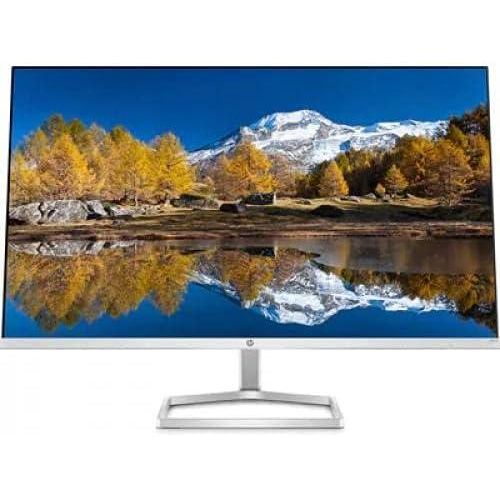
27-inch IPS QHD Computer Monitor M27fq
₦548,560.00
PICTURE-PERFECT IMMERSION – Work or play, your content reaches a whole new level of detail with QHD resolution (2560 x 1440), IPS technology for 178 degrees ultra-wide viewing angles, and 99% sRGB color gamut for a wider range of colors and greater color accuracy.Brightness is 300nit; Aspect Ratio is 16:9FLUID PERFORMANCE – Your HP monitor
Description
About the Product 🔑
| Features ✨ | Details 🌟 |
|---|---|
| Resolution 🖼️ | Quad HD Resolution |
| Display Technology 💡 | IPS Technology |
| Viewing Angles 👀 | Ultra-wide Viewing Angles |
| Color Gamut 🎨 | 99% sRGB Color Gamut |
| Comfort & Wellness ✅ | HP Eye Ease with Eyesafe Certified Technology |
| Sustainability ♻️ | Built with Recycled Ocean-Bound Plastics and Recycled Materials |
| Design 🖥️ | Slim Profile, 3-Sided Borderless Design |
| Cable Management 🧹 | Innovative Monitor Neck Stand |
| Connectivity 🔌 | Two HDMI Ports, 1 x DisplayPort 1.2 |
| Ergonomics ⬆️ | Tilt-Adjustable Screen |
| Refresh Rate ⚡ | 75Hz Refresh Rate |
| Adaptive Sync 💨 | Freesync Technology |
| Brightness 🔆 | 300nit |
| Aspect Ratio 📏 | 16:9 |
Product Benefits 💡
- Redefine comfort, wellness, and sustainability.
- Picture-perfect for gaming or working.
- Vibrant and accurate colors for a stunning visual experience.
- Sharp image quality with great clarity.
- Eliminates screen tearing and shuttering.
- Seamless side-by-side, dual monitor setup.
- Keep your workspace clutter-free.
- Connect all your extra devices and accessories.
- Find the best angle to view your monitor.
Usage Instruction 🧾
- Step 1: 🔌 Connect the power cable.
- Step 2: 🖥️ Power on the monitor.
- Step 3: ⚙️ Adjust settings as needed.
- Step 4: 🖱️ Connect your devices via HDMI or DisplayPort.
Product Specification 📱
| Specification | Description |
|---|---|
| Display Size 📏 | 27-inch |
| Resolution 🖼️ | 2560 x 1440 (QHD) |
| Panel Type 💡 | IPS |
| Refresh Rate ⚡ | 75Hz |
| Color Gamut 🎨 | 99% sRGB |
| Brightness 🔆 | 300 nits |
| Viewing Angle 👀 | 178° |
| Connectivity 🔌 | 2x HDMI, 1x DisplayPort 1.2 |
| Features ✅ | Freesync, HP Eye Ease |
Product Details 🏷️
Find manuals, setup and user guides for your HP M27fq QHD Monitor.
The HP M27fq monitor boasts an impressive color gamut of 99%, providing vibrant and accurate colors for a stunning visual experience. With an IPS panel type and a display resolution of 2560 x 1440 pixels, this 27-inch flat screen monitor offers sharp image quality with great clarity.
Work or play, your content reaches a whole new level of detail with QHD resolution (2560 x 1440), IPS technology for 178 degrees ultra-wide viewing angles, and 99% sRGB color gamut for a wider range of colors and greater color accuracy.
Your HP monitor eliminates screen tearing and shuttering as the 75hz refresh rate and Freesync technology combine to keep your eyes up to speed with your imagination.
Increase viewing comfort with HP Eye Ease with Eyesafe certified technology that doesn’t sacrifice color quality.
Designed with sustainability in mind, your monitor is built with recycled ocean-bound plastics and other recycled materials; plus, even the packaging it comes in is made with 100% recycled materials.
The slim profile and 3-sided, borderless design allows for a seamless, side-by-side, dual monitor setup.
Keep your workspace clutter-free with the innovative monitor neck stand that contains and manages your cables.
Connect all your extra devices and accessories with two HDMI ports and 1 x DisplayPort 1.2.
Find the best angle to view your monitor with a tilt-adjustable screen.
Full Images
Product Standout Benefits
Work or play, your content reaches a whole new level of detail with QHD resolution (2560 x 1440), IPS technology for 178 degrees ultra-wide viewing angles, and 99% sRGB color gamut for a wider range of colors and greater color accuracy.
- Brightness is 300nit
- Aspect Ratio is 16:9
Your HP monitor eliminates screen tearing and shuttering as the 75hz refresh rate and Freesync technology combine to keep your eyes up to speed with your imagination.
Increase viewing comfort with HP Eye Ease with Eyesafe certified technology that doesn’t sacrifice color quality.
Designed with sustainability in mind, your monitor is built with recycled ocean-bound plastics and other recycled materials; plus, even the packaging it comes in is made with 100% recycled materials.
The slim profile and 3-sided, borderless design allows for a seamless, side-by-side, dual monitor setup.
Keep your workspace clutter-free with the innovative monitor neck stand that contains and manages your cables.
Connect all your extra devices and accessories with two HDMI ports and 1 x DisplayPort 1.2.
Find the best angle to view your monitor with a tilt-adjustable screen.
Quick and easy to use, the HP Display Center lets you manage your display settings directly from the screen, such as adjusting display color and changing video input settings.
Enjoy peace of mind with a monitor covered with a 1-year limited hardware warranty.
Customer Questions and Answers
Q: How do I get the best picture quality? 🤔
A: For picture-perfect immersion, you’ll want to use the QHD resolution (2560 x 1440) with IPS technology for those super wide viewing angles, and a 99% sRGB color gamut. This gives you a wider range of colors and they’ll be super accurate!
Q: Is this monitor good for gaming or fast-paced content? 🔥
A: Absolutely! It’s designed for fluid performance. The 75hz refresh rate and Freesync technology work together to eliminate screen tearing and stuttering, so everything looks smooth.
Q: Will this monitor be easy on my eyes? 🌸
A: Yes! It features HP Eye Ease with Eyesafe certified technology, which helps increase viewing comfort without messing with the color quality. It’s designed to be easy on your eyes.
Q: Is this monitor environmentally friendly? 🌿
A: It sure is! It’s designed with sustainability in mind, using recycled ocean-bound plastics and other recycled materials. Even the packaging is made from 100% recycled materials!
Q: Can I set up multiple monitors easily? 🖥️
A: Definitely! The slim profile and 3-sided, borderless design make it super seamless to set up two monitors side-by-side. Plus, the cable management helps keep your setup neat.
Q: How do I manage my display settings? 💡
A: It’s a breeze! The HP Display Center lets you manage all your display settings right from the screen, like adjusting colors and changing video inputs. Super convenient!
Related Products
-

SE2725HM 27 Inch Full HD Monitor Black New
₦340,200.00 -

ThinkVision T24t-20 23.8 Inch Full HD Touchscreen Monitor
₦647,580.00 -

Series 5 27-Inch FHD Monitor with Integrated Speakers – 527sa – Refurbished
₦432,780.00 -

27 Inch Full HD 1080p LED Monitor
₦510,120.00 -

27 Inch Series 5 FHD Monitor with Built-in Speakers – 527sa
₦340,200.00 -

24.5-inch Full HD 240Hz 0.5ms Gaming Monitor with 25g3zm/bk Model
₦417,320.00 -
OMEN 27 inch FHD 165Hz Gaming Monitor for Immersive Play
₦505,840.00 -

SE2222H 21.5 Inch Full HD VA Black Monitor
₦219,940.00 -

LG 34bk650-w 34 Inch Ips Wfhd Ultrawide Monitor 2560×1080
₦696,940.00 -

27 Inch M70C UHD Smart Monitor White with USB-C Speakers and Remote Included
₦270.76 -

Omen 32c 31.5 Inch QHD 165Hz Curved Gaming Monitor 2560×1440 1ms GTG
₦1,011,700.00 -

32 Inch UJ59 Series 4K UHD Computer Monitor VA Panel 3840×2160 Resolution
₦674,720.00 -

OMEN 27″ FHD 165Hz Gaming Monitor – Excellent Condition
₦494,600.00 -

34 Inch ViewFinity S65VC Series Ultrawide QHD Curved Monitor
₦933,700.00 -

Dell P2425H 24-inch Full HD IPS Monitor – Refurbished Black Silver
₦195.03 -

ViewFinity S65VC Series 34 Inch Ultrawide QHD Curved Monitor
₦933,700.00 -

E24q G5 24-inch QHD 2560×1440 Monitor Refurbished
₦556,440.00 -

Legion R24e 23.8 Inch Full HD Gaming Monitor 180Hz 0.5ms Response
₦314,980.00 -

21.5 Inch Full HD Edge LED LCD Monitor 16:9 Aspect Ratio Black
₦239,820.00 -
27 Inch Full HD LED Monitor 16:9 Aspect Ratio
₦427,480.00