


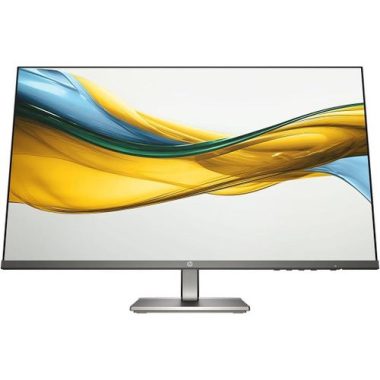
24-inch Touchscreen USB-C Hub Monitor with Sleek Design and User-Friendly Interface
₦867,980.00
Tech SpecsGeneralDisplay TypeLED-backlit LCD monitor / TFT active matrixDiagonal Size24″Viewable Size23.8″Built-in DevicesUSB 3.2 Gen 1/USB-C hubUSB Power Delivery90WattPanel TypeIPSAspect Ratio16:9Native ResolutionFull HD (1080 p) 1920 x 1080at 60 HzPixel Pitch0.2745 mmPixel Per Inch93Brightness300 cd/m²Contrast Ratio1000:1 / 1000:1 (dynamic)Color Support16.7 million colorsColor Gamut99% sRGBResponse Time5 ms (gray-to-gray fast), 8 ms (gray-to-gray normal)Horizontal Viewing Angle178°Vertical Viewing Angle178°Screen
Description
🔍 Overview:
- This touch USB-C Hub monitor offers extensive connectivity options including USB-C (up to 90W power delivery), RJ45 for wired Ethernet access, super speed USB for fast data transfers.
- The Dell P2424HT has an articulating stand, a USB hub, and good contrast.
⭐ Key Features:
- Touchscreen functionality.
- USB-C wiht power delivery.
- Adjustable stand for convenience.
- Integrated Ethernet for stable connections.
- Vibrant IPS display with rich colors.
🧪 Specification:
| Diagonal Size: | 24″ |
| Viewable Size: | 23.8″ |
| Panel Type: | IPS |
| Native Resolution: | Full HD (1080p) 1920 x 1080 at 60 Hz |
| Brightness: | 300 cd/m² |
| Contrast Ratio: | 1000:1 / 1000:1 (dynamic) |
| Color Support: | 16.7 million colors |
| Response Time: | 5 ms (gray-to-gray fast) |
| Weight: | 17.33 lbs |
| Speakers: | Mono, 3 Watt output power per channel |
🧭 Buyer’s guide:
View and Download Dell Pro 24 Plus Touch user manual online.


Product Standout Benefits
Adjustable for Maximum Comfort
This 23.8 inch touchscreen monitor features a versatile stand with (0-110mm)height, (-90°-0°)pivot, (-45°-45°)swivel, and (-5°-25°)tilt adjustable. Whether you’re working or enjoying multimedia, this touch monitor allowing you to customize your viewing angle for maximum comfort.
VESA Mounting Compatibility
It supports 75x75mm VESA mounting standards, easily install the monitor on walls or stands and keeping your workspace organized.
Responsive 10-Point Touch Full HD Display
Enjoy stunning visuals with a Full HD 1920x1080P resolution on this 10 point touch computer touchscreen. The responsive 10-point touch technology delivers a smooth and precise interaction, making it perfect for browsing, document editing, or creative tasks. Suitable for office work and study.
Built-in Speakers for Convenience
- With integrated high-quality speakers, this touchscreen monitor eliminates the need for external audio devices and saving desk space.
- Whether you’re watching videos or enjoying music, you’ll experience clear sound without the clutter of extra equipment.
Vibrant Colors and Smooth Refresh Rate
- Boasting 99% sRGB color coverage, this touchscreen monitor ensures vibrant and accurate color reproduction, ideal for graphic design and multimedia work.
- The 75Hz refresh rate provides a fluid viewing experience, minimizing lag and blurriness during fast-paced action.
- Contrast Ratio: 1000:1
Broad Compatibility and Eye Care
- This desktop touchscreen monitor with HDMI, VGA and Type-B ports for easy integration with various devices.
- The low-blue light technology protects eyes from visual fatigue caused by long hours of work.
Customer Questions and Answers
Q: How do I use this product in portrait mode?
To use portrait mode, you need to adjust the display mode on your device. Please adjust the display mode of the device from “Landscape” mode to “Portrait (Flip)” mode in the display settings, and then rotate the monitor -90°.
Q: Is this monitor good for office work and study?
Absolutely! This 10-point touch Full HD display offers a smooth and precise interaction, making it perfect for browsing, document editing, or creative tasks. It’s suitable for office work and study.
Q: How do I get the built-in speakers to work?
Connecting the HDMI port of the monitor is how you get the built-in speakers functionality.
Q: Can I use the touch functionality with my gaming device or Apple product?
Please Note: The touch functionality of this 23.8 inch monitor does not support on gaming devices, Apple devices, XP system and Linux system.
Q: How do I enable touch functionality?
Please note: Connecting the Type-B port of this monitor to get touch functionality.
Q: What type of color coverage does this monitor offer?
Boasting 99% sRGB color coverage, this touchscreen monitor ensures vibrant and accurate color reproduction, ideal for graphic design and multimedia work.
Q: What are the display dimensions?
Product Dimensions: 0
Buyer’s Guide
Step 1: 💡 Review the Features & Benefits
Check out the key features and benefits to make sure it’s exactly what you need. Look into the adjustable stand, 10-point touch Full HD display, built-in speakers, and vibrant color reproduction.
Step 2: ❓ Read the FAQs
Go through the FAQs for any last-minute questions about how the product works, its specific use cases like portrait mode, touch functionality with different devices, and audio setup.
Step 3: 🔌 Connect Your Device
Connect your device using the available HDMI, VGA, or Type-B ports. Remember, Type-B port is needed for touch functionality and HDMI for built-in speakers.
Step 4: 📐 Customize Your View
Adjust the height, pivot, swivel, and tilt of the stand to customize your viewing angle for maximum comfort. If you need portrait mode, remember to adjust your device’s display settings.
Step 5: 🖼️ Consider VESA Mounting
If you prefer a clean workspace, consider using the 75x75mm VESA mounting standards to easily install the monitor on walls or stands.
Step 6: ✨ Enhance Your Setup
Look into accessories that can enhance your experience, such as a high-quality HDMI cable, a comfortable ergonomic chair to complement the adjustable stand, or a screen cleaning kit to keep your display pristine.
Related Products
-

Alienware AW3225QF 32-Inch 4K UHD Curved Gaming Monitor 1700R
₦3,200,235.00 -

P2725H 27 Inch Full HD 1920×1080 16:9 IPS LED 100Hz Monitor
₦333,634.14 -

ThinkVision T24t-20 23.8 Inch Full HD Touchscreen Monitor
₦647,580.00 -

55 Inch Samsung Odyssey Ark G97NC 4K UHD 165Hz Gaming Monitor LS55CG970NUXEN
₦3,453,634.00 -

V24 23.8 Inch Full HD 3 Edge HDMI VGA Monitor
₦230,800.74 -

57 Inch Odyssey Neo G9 G95NC Dual UHD 240Hz Curved Gaming Monitor
₦3,296,652.00 -

27 Inch Full HD 1080p LED Monitor
₦510,120.00 -

55-inch Curved 4K UHD Smart Gaming Monitor – Refurbished
₦3,453,634.00 -

P22 G5 21.5 Inch Full HD Black LCD Monitor 16:9 Aspect Ratio
₦243,300.00 -

57 Inch Odyssey Neo G9 G95NC Dual UHD Curved Gaming Monitor
₦3,296,652.00 -

C24-25 Full HD 23.8 Inch VA LCD Monitor Black
₦333,840.00 -

P24v G5 24 Inch Full HD 16:9 Black LCD Monitor
₦278,580.00 -

V24 23.8 Inch Full HD 3-Edge Monitor with HDMI and VGA Connectivity
₦228,517.11 -

ASUS ZenScreen MB166CR 15.6 Inch FHD Portable USB-C Monitor
₦443,160.00 -

21.45 Inch Full HD Monitor AMD FreeSync™ Compatible
₦121,100.00 -

23.8 Inch Full HD IPS 1ms GTG Gaming Monitor 24GN60R-B
₦333,300.00 -

23.8 Inch IPS Full HD Monitor with AMD FreeSync Technology
₦319,600.00 -

21.45 Inch Full HD Monitor with AMD FreeSync Technology
₦121,100.00 -
27 Inch Full HD LED Monitor 16:9 Aspect Ratio
₦427,480.00 -

34 Inch 34WR55QK UltraWide QHD Curved Monitor with USB Type-C™ Connectivity
₦853,260.00