
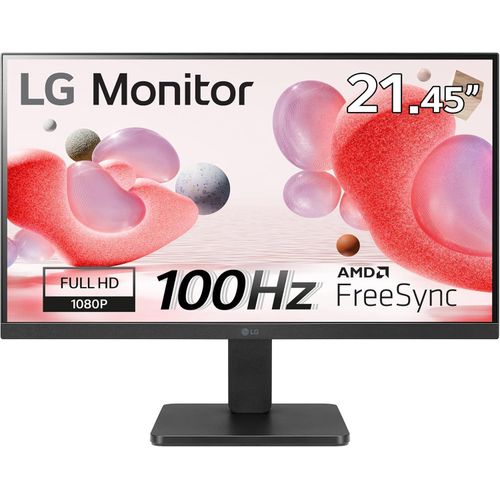
23.8 Inch IPS Full HD Monitor with AMD FreeSync Technology
₦319,600.00
A fast 100Hz refresh rate provides a smooth frame loading in various programs and realistic gameplayReader Mode adjusts colour temperature and luminance, supporting a suitable viewing experience for reading on a monitor. Flicker Safe reduces invisible flickering on the screen.You can enjoy smooth, clear movement in high resolution and fast-paced games with AMD FreeSync and
Description
About the Product 🔑
 |
|
| Feature | Description |
| AMD FreeSync Premium ✅ | Game frame rate determined by graphics card, not monitor refresh rate 🎮 |
| Comfortable Viewing ✨ | Flicker-less, low dimming, ComfyView display 😊 |
| AMD FreeSync™ Technology 🚀 | Smooth, clear movement in high resolution and fast-paced games 🏃 |
| Eliminates Screen Tearing 🚫 | Provides an immersive gaming experience 💯 |
| Product Name 🏷️ | Acer Nitro KG241Y M3biip 23.8″ Gaming Monitor 🖥️ |
| Resolution 🌟 | Full HD (1920 x 1080) 🖼️ |
| Panel Type 💡 | IPS Display 🌈 |
| Refresh Rate ⚡ | 180Hz Refresh Rate 💨 |
| Response Time ⏱️ | Up to 0.5ms 🤏 |
| Color Gamut 🎨 | sRGB 99% 🌟 |
| HDR Support ⭐ | Yes 👍 |
| VESA Mounting 🔩 | Compliant (100 x 100mm) 📐 |
| Ports 🔌 | 1 x Display Port 1.2, 2 x HDMI 2.0 Ports ↔️ |
Usage Instruction 🧾
- Step 1: 🔌 Connect the power cable to the device.
- Step 2: 🖥️ Set up the monitor according to the manual.
- Step 3: 🎮 Enjoy smooth, clear movement in high resolution and fast-paced games with AMD FreeSync™ technology.
- Step 4: 📖 Refer to the User Manual of Product 1: Acer R241Y Bbix 23.8″ Full HD (1920 x 1080) IPS Monitor | AMD FreeSync Technology | Ultra-Thin | Edge-to-Edge | Zero-Frame | 1ms VRB | 75Hz | (HDMI & VGA ports).
- Step 5: ⚙️ Adjust display settings with OnScreen Control software for a suitable viewing experience.
- Step 6: 🧘 Activate Reader Mode for comfortable reading and Flicker Safe to reduce screen flickering.
- Step 7: ⚫ Utilize Black Stabiliser for enhanced visibility in dark scenes.
- Step 8: 📏 Create a suitable work environment with convenient tilt adjustment.
Product Specification 📱
| Specification | Description |
| Refresh Rate ⚡ | 100Hz Smooth frame loading 👍 |
| Reader Mode 📖 | Adjusts colour temperature and luminance for reading 💡 |
| Flicker Safe 🚫 | Reduces invisible flickering on screen ✨ |
| AMD FreeSync™ 🚀 | Smooth, clear movement 🏃 |
| Black Stabiliser ⚫ | Enhanced visibility in dark scenes 🌟 |
| OnScreen Control 🖱️ | Easily control display settings ✅ |
| Bezel Design 📏 | Slim bezel on three sides 🖼️ |
| Tilt Adjustment 📐 | Convenient tilt adjustment 👍 |
Product Details 🏷️
- Through AMD FreeSync Premium technology, the game’s frame rate is determined by your graphics card, not the fixed refresh rate of the monitor, giving you a serious competitive edge.
- Plus, users can enjoy comfortable viewing experience while gaming via flicker-less, low dimming and ComfyView display.
- With AMD FreeSync™ technology, gamers can enjoy smooth, clear movement in high resolution and fast-paced games.
- It virtually eliminates screen tearing and stuttering, providing an immersive gaming experience.
- Acer Nitro KG241Y M3biip 23.8″ Gaming Full HD (1920 x 1080) IPS Monitor with AMD FreeSync Premium Technology, 180Hz Refresh Rate, Up to 0.5ms, sRGB 99%, HDR, VESA mounting compliant (100 x 100mm) (1 x Display Port 1.2, 2 x HDMI 2.0 Ports)
- User Manual of Product 1: Acer R241Y Bbix 23.8″ Full HD (1920 x 1080) IPS Monitor | AMD FreeSync Technology | Ultra-Thin | Edge-to-Edge | Zero-Frame | 1ms VRB | 75Hz | (HDMI & VGA ports)
- LG 24ML44B-B 24” Class Full HD IPS LED Monitor with AMD FreeSync (23.8” Diagonal) – Use Manual – Use Guide PDF.
- A fast 100Hz refresh rate provides a smooth frame loading in various programs and realistic gameplay.
- Reader Mode adjusts colour temperature and luminance, supporting a suitable viewing experience for reading on a monitor.
- Flicker Safe reduces invisible flickering on the screen.
- You can enjoy smooth, clear movement in high resolution and fast-paced games with AMD FreeSync and Black Stabiliser.
- Easily control display settings with a few clicks using OnScreen Control software.
- This display has a slim bezel on three sides, allowing you to create a suitable work environment through convenient tilt adjustment.
Full Images


Product Standout Benefits
Introducing Acer’s KG241Y gaming monitor – the Full HD (1920 x 1080) resolution monitor that can keep up with your game play.
- 23.8″ Full HD (1920 x 1080) Widescreen IPS Monitor
- AMD FreeSync Premium Technology
- Refresh Rate: 180Hz
- Response Time: 1ms (G to G) – Up to 0.5ms (G to G)
- Color Gamut: 99% sRGB
- HDR10 Support
- Zero-Frame Design
- Ergonomic Tilt: -5° to 15°
- Ports: 1 x Display Port 1.2 and 2 x HDMI 2.0 (HDMI Cable Included)
Through AMD FreeSync Premium technology, the game’s frame rate is determined by your graphics card, not the fixed refresh rate of the monitor, giving you a serious competitive edge.
Plus, users can enjoy comfortable viewing experience while gaming via flicker-less, low dimming and ComfyView display.
The design saves space on your desk and lets you place multiple monitors side by side to build a seamless big-screen display.
Customer Questions and Answers
Q: What makes this monitor great for gaming?
A: In competitive gaming, every frame matters. This monitor has a Full HD (1920 x 1080) resolution and AMD FreeSync Premium technology, which means your game’s frame rate is determined by your graphics card, not the monitor’s fixed refresh rate, giving you a serious competitive edge. Plus, it has a super-fast 180Hz refresh rate and a response time of 1ms (G to G) – up to 0.5ms (G to G).
Q: Is the display comfortable for long gaming sessions?
A: Absolutely! You can enjoy a comfortable viewing experience while gaming thanks to flicker-less, low dimming, and ComfyView display features.
Q: Can I connect multiple monitors easily?
A: Yes! The Zero-Frame Design saves space on your desk and lets you place multiple monitors side by side to build a seamless big-screen display.
Q: What ports are available on this monitor?
A: It comes with 1 x Display Port 1.2 and 2 x HDMI 2.0. A HDMI cable is also included!
Q: Can I mount this monitor?
A: Yes, it’s VESA mounting compliant with a 100 x 100mm pattern.
Q: Does the monitor support HDR?
A: Yes, it features HDR10 Support for enhanced visuals.
Related Products
-

V24 23.8 Inch Full HD 3 Edge HDMI VGA Monitor
₦230,800.74 -

55-inch Curved 4K UHD Smart Gaming Monitor – Refurbished
₦3,453,634.00 -

27 Inch Full HD 1080p LED Monitor
₦510,120.00 -

57 Inch Odyssey Neo G9 G95NC Dual UHD Curved Gaming Monitor
₦3,296,652.00 -

P22 G5 21.5 Inch Full HD Black LCD Monitor 16:9 Aspect Ratio
₦243,300.00 -

Omen 32 Inch QHD 165Hz Curved Gaming Monitor 2560×1440 3000:1 1ms GTG
₦875,840.00 -

C24-25 Full HD 23.8 Inch VA LCD Monitor Black
₦333,840.00 -

P24v G5 24 Inch Full HD 16:9 Black LCD Monitor
₦278,580.00 -

V24 23.8 Inch Full HD 3-Edge Monitor with HDMI and VGA Connectivity
₦228,517.11 -

ASUS ZenScreen MB166CR 15.6 Inch FHD Portable USB-C Monitor
₦443,160.00 -

21.45 Inch Full HD Monitor AMD FreeSync™ Compatible
₦121,100.00 -

23.8 Inch Full HD IPS 1ms GTG Gaming Monitor 24GN60R-B
₦333,300.00 -

21.45 Inch Full HD Monitor with AMD FreeSync Technology
₦121,100.00 -

34 Inch 34WR55QK UltraWide QHD Curved Monitor with USB Type-C™ Connectivity
₦853,260.00 -
27 Inch Full HD LED Monitor 16:9 Aspect Ratio
₦427,480.00 -

P2725H 27 Inch Full HD 1920×1080 16:9 IPS LED 100Hz Monitor
₦333,634.14 -

Alienware AW3225QF 32-Inch 4K UHD Curved Gaming Monitor 1700R
₦3,200,235.00 -

55 Inch Samsung Odyssey Ark G97NC 4K UHD 165Hz Gaming Monitor LS55CG970NUXEN
₦3,453,634.00 -

ThinkVision T24t-20 23.8 Inch Full HD Touchscreen Monitor
₦647,580.00 -

57 Inch Odyssey Neo G9 G95NC Dual UHD 240Hz Curved Gaming Monitor
₦3,296,652.00