
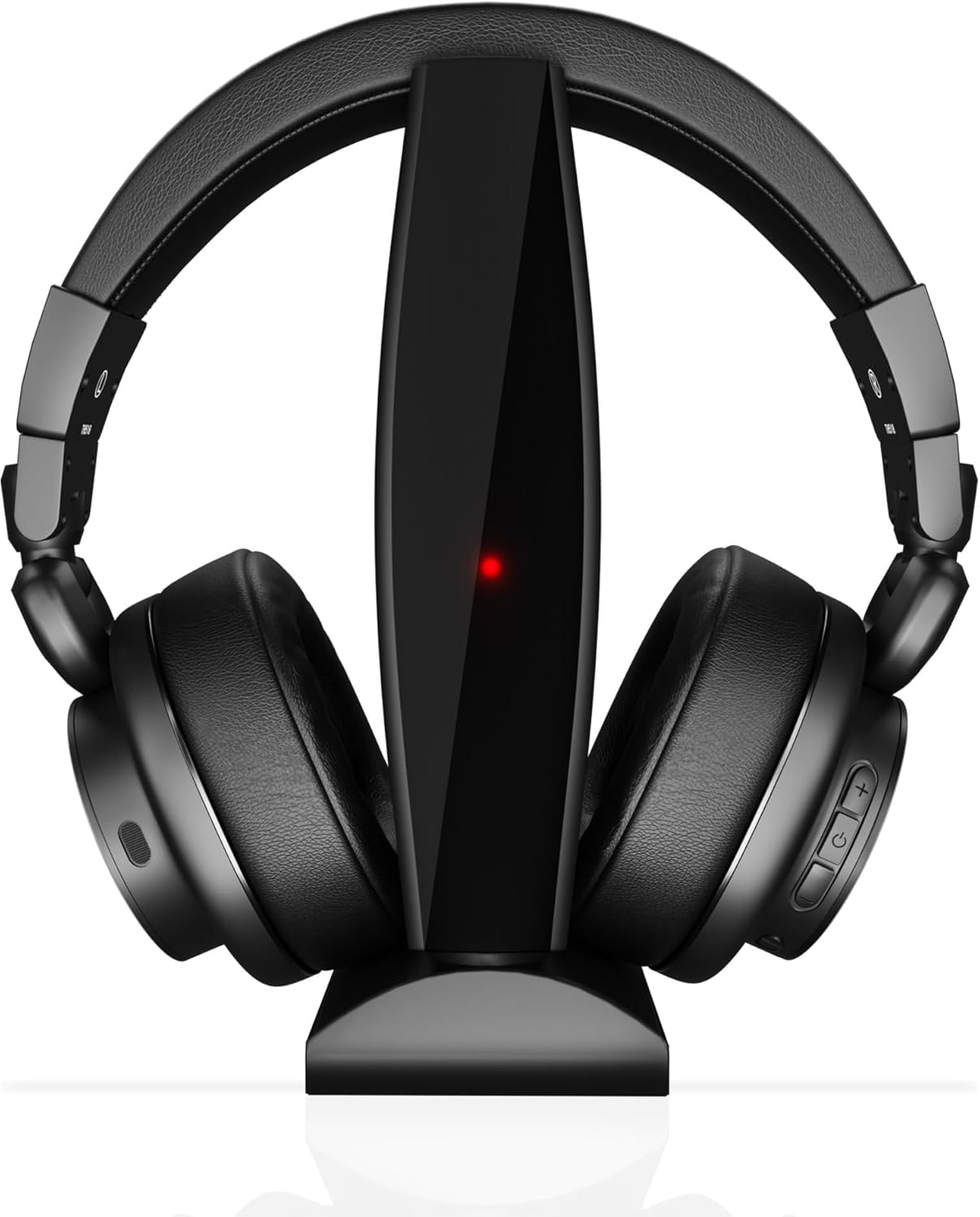


Senior Wireless TV Headphones 50H Battery 164ft Range 3D HD Sound Dual Mode Bluetooth 2.4G
₦109,980.00
Description
### About the Product 🔑
| Crystal-clear 3D HD stereo sound 📺 | Enhances dialogue and action, perfect for seniors with hearing difficulties. 🔗 |
| 164ft Long Range & Dual Mode 🔗 | Works up to 164ft via 2.4G + Bluetooth, compatible with TVs, phones, and tablets. 📱 |
| 50-HOUR Battery & 1000mAh Fast Charge 🔋 | Lasts 50 hours on a single charge. Ideal for all-day binge-watching. binge-watching. |
| Easy-to-Use for Seniors 👵 | Feature one-touch controls and lightweight design for comfortable, fatigue-free use. |
| Universal Compatibility 🎛️ | Works with AUX, RCA, coaxial ports; perfect for wireless tv headphones for tv watching on any TV model. |
| No Disturbance, Private Enjoyment 🔇 | Enjoy TV at any volume without waking family; ensure quiet nighttime viewing. |
| Dual Connectivity 🎧 | Switch seamlessly between Bluetooth and 2.4G wireless mode for lag-free audio. |
### Product Benefits 💡
| Clear Sound 🔊 | Crystal-clear 3D HD stereo sound enhances dialogue and action, perfect for seniors with hearing difficulties. |
| Extended Range 📡 | 164ft long range via 2.4G + Bluetooth, compatible with multiple devices. |
| Long Battery Life ⏳ | 50-hour battery life with 1000mAh fast charge for extended use. |
| User-Friendly Design 👍 | Easy-to-use for seniors with one-touch controls and a lightweight, comfortable design. |
| Wide Compatibility 🔄 | Works with AUX, RCA, and coaxial ports for universal TV compatibility. |
| Private Listening 🤫 | Allows for private TV watching at any volume without disturbing others. |
| Seamless Switching ↔️ | Dual connectivity modes (Bluetooth and 2.4G) for flexible audio connection. |
### Usage Instruction 🛠️
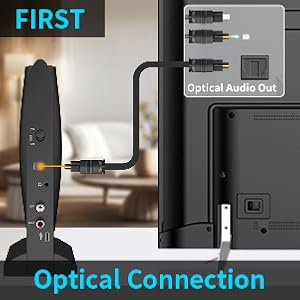
* Step 1: 🔌 Plug in the power and turn the transmitter switch “ON”. If there is no USB interface on your wall, you need to connect the power supply through a USB plug. The USB plug is not included in the package.
* Step 2: 🎧 Plug the optical/AUX 3.5mm/RCA audio cable into the TV transmitter and TV output port (select only one), switch the headset mode to 2.4G mode, long press the Power switch on the TH518 to power on and pair.
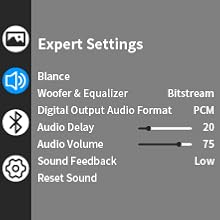
* Step 3: ⚙️ Set up Audio Output on Your TV. Go to “Settings” > Click “Sound/Audio” > Click “Sound Output/Expert Settings/Advanced” > Click “Audio Digital Output Format” > Select “PCM/Stereo/Optical”.
* Step 4: ▶️ Enjoy Your TV Journey. Put on your headphones, sit down, press the power button to start playing sound, and start your journey.
### Product Specification 📱
| Connectivity Technology 🔗 | Wireless |
| Wireless Communication Technology 📶 | Bluetooth |
| Included Components 📦 | User Manual |
| Specific Uses For Product 📺 | Watching TV |
| Compatible Devices 📱 | Television, Cellphones, Tablets |
| Item Weight ⚖️ | 0.82 Kilograms |
| Frequency Range 🔊 | 20 Hz – 20,000 Hz |
| Unit Count 💯 | 1.0 Count |
| Control Method 🖱️ | App, Push Button |
| Number of Items 🔢 | 1 |
| Battery Life 🔋 | 50 Hours |
| Earpiece Shape 👂 | Over-ear |
| Manufacturer 🏭 | cwuiga |
| Package Dimensions 📏 | 10.39 x 9.72 x 4.25 inches |
| Item Weight ⚖️ | 1.81 pounds |
| ASIN 🆔 | B0DW996G9Q |
| Item model number 🏷️ | TH5 |
| Batteries 🔋 | 1 Nonstandard Battery batteries required. (included) |
| Customer Reviews ⭐ | 2.7 out of 5 stars (12 ratings) |
| Best Sellers Rank 🥇 | #196,049 in Electronics, #4,268 in Over-Ear Headphones |
| Date First Available 🗓️ | February 6, 2025 |
### Product Details 🏷️
* Questions and Answers ❓
* Q: Can I connect the two or three included cables at the same time for better audio signal reception?
A: No, this affects the audio reception instead; if you want to use RCA cables then connect only RCA cables (make sure there is only one connection at a time).
* Q: How do I mute my headphones?
A: Please click the power button on the side of the headphones to pause the audio. Kindly note: pressing the ON/OFF button will only pause the audio from the headphones and will not affect the playback of the TV program.
* Q: My TV does not have an audio output port. Can I buy these headphones to watch TV?
A: If your TV has Bluetooth function, you can connect the headphones and TV via Bluetooth. First, switch the mode switch of the headset to Bluetooth mode. Then pair it with the TV.
* Q: How to adjust the volume?
A: Click the volume “+” or “-” button slowly on these TH-518. Please keep twice volume button clicks with 1 second stop. If the TH-518 volume is at the max level and you want to increase the volume again, you could adjust the volume in the audio source, such as your TV or DVD volume.
* Q: The headphones are connected to the transmitter, why is there no sound from the headphones when watching TV?
A: (1) After confirming the connection, press the power button again to start playback. (2) Please ensure your TV audio is set to “External Speaker”. (3) If you select Optical audio input, please ensure: (a) Ensure your TV audio format is set to “PCM”, the transmitter can decode PCM, but can’t decode Dolby/DTS. (b) Ensure the 3.5mm audio cable is NOT plugged in, or the transmitter will prioritize the AUX input. (4) If you select AUX audio input, please ensure the transmitter is connected to the correct analog audio port on the audio sources—Plug in a pair of wired headphones/earbuds into your audio source’ audio output to check if it works.
* Q: How to charge headphones?
A: You can use the included Type-c charging cable to charge the headphones, and the USB interface can be connected to a power bank or USB plug.





**Warranty & Support** 🛡️
* Product Warranty: For warranty information about this product, please click here.
Full Images
Product Standout Benefits
Enjoy your favorite shows and movies with these wireless headphones designed for an immersive audio experience.
- Wireless Headphones for TV Watching – Crystal-clear 3D HD stereo sound enhances dialogue and action, perfect for seniors with hearing difficulties.
- 164ft Long Range & Dual Mode – Wireless TV headphones work up to 164ft via 2.4G + Bluetooth, compatible with TVs, phones, and tablets.
- 50-HOUR BATTERY & 1000mAh Fast Charge – Bluetooth headphones for TV last 50 hours on a single charge, ideal for all-day binge-watching.
- Easy-to-Use for Seniors – TV headphones wireless for seniors feature one-touch controls and lightweight design for comfortable, fatigue-free use.
- Universal Compatibility – Works with AUX, RCA, coaxial ports; perfect for wireless tv headphones for tv watching on any TV model.
- No Disturbance, Private Enjoyment – Enjoy TV at any volume without waking family; headphones for tv watching for seniors ensure quiet nighttime viewing.
- Dual Connectivity – Switch seamlessly between Bluetooth headphones for tv and 2.4G wireless mode for lag-free audio.
Customer Questions and Answers
Got questions? We’ve got answers!
How do I use these headphones with my TV? 🤔
They work up to 164ft via 2.4G + Bluetooth, so they’re compatible with TVs, phones, and tablets. Plus, they work with AUX, RCA, and coaxial ports, making them perfect for any TV model!
How long can I watch TV without needing to recharge? 🔋
You get a massive 50 hours of battery life on a single charge, which is perfect for all-day binge-watching sessions!
Are these headphones easy for seniors to use? 👵
Absolutely! They have one-touch controls and a lightweight design, making them super comfortable and easy to use, even for extended periods.
Can I listen to TV without disturbing anyone else? 🔇
Definitely! You can enjoy TV at any volume without waking up family members. They’re great for quiet nighttime viewing.
Can I switch between connecting to my TV and my phone? 🔗
Yes, you can! You can switch seamlessly between Bluetooth headphones for TV and 2.4G wireless mode for lag-free audio, so you’re always connected to what you want to hear.
Related Products
-

M-Audio HDH40 Black Closed Back Over Ear Studio Headphones with 2.7m Cable
₦39.00 -

Sony WH-1000XM5 Black Wireless Noise Canceling Over-Ear Headphones with 3 Year Protection
₦620,000.00 -

WallarGe Dual Over-Ear Wireless TV Headphones with RF Transmitter, Two Sets, No Lip-Sync Delay, Plug and Play
₦99.99 -

Sony WH-1000XM5 Black Wireless Noise Canceling Over-Ear Headphones 2-Year Protection
₦596,000.00 -

19.5ft Extra Long Wired Over-Ear Headphones with Volume Control for TV PC Seniors
₦18.99 -

18ft Extra Long Spring Coiled Headphones with Volume Control for TV PC
₦23.99 -

Senior Wireless TV Headphones with Charging Base Fast Delivery Nigeria
₦150,000.00 -

Poly Voyager 4320 UC Wireless Headset with Charge Stand and Boom Mic – Connect to PC, Mac, and Cell Phone
₦139.99 -

SIMOLIO Comfortable Portable Wireless TV Headphones for Easy Viewing Fast Delivery
₦175,000.00 -

SEREONIC WH100 Wireless TV Headphones UHF RF Transmitter Charging Dock 150ft Range No Audio Delay Optical System
₦25,135.03 -

Premium Wireless Noise-Canceling Headphones with Comfortable Portable Design, Fast Nigeria Delivery
₦225,030.00 -

Pro TV Wireless Headphones for Seniors 100ft Range Loud Volume 60-Day Trial
₦219,980.00 -

Comfortable Over-Ear Bluetooth 5.3 Wireless Headset with Advanced Noise Reduction Mic for PC, Laptop, iPhone, Android, Zoom
₦119,980.00 -
Sale!
COOSII H300 Wireless Bluetooth Headphones with Noise Cancelling Mic, USB Dongle, Mute, 13-Word Title
Original price was: ₦15,466.00.₦6,819.00Current price is: ₦6,819.00. -

WallarGe 100ft Wireless TV Headphones with Charging Dock, 20 Hour Battery, Black/Red
₦54.99 -

Holdsound 15 Hour Playtime Wireless TV Headphones for Seniors, Black Neckband with Transmitter and USB Extension Cable, No Audio Delay
₦79.99 -

WallarGe 25-Hour Play Wireless Headphones for Seniors Bluetooth 5.3 USB Transmitter No Delay
₦39.99 -

2.4G Wireless Headphones for TV, 100ft Range, LED Charging Dock, Zero Latency Bluetooth Headset for Seniors
₦159,980.00 -

Gold Digital Wireless TV Headset System with Earbuds, 100 ft Range, 12hr Rechargeable Battery
₦159,980.00 -

Sony WH-1000XM5 Black Wireless Noise Canceling Headphones 30hr Battery Life Alexa Google Assistant Built-in Mic
₦570,000.00
Reviews
There are no reviews yet.