


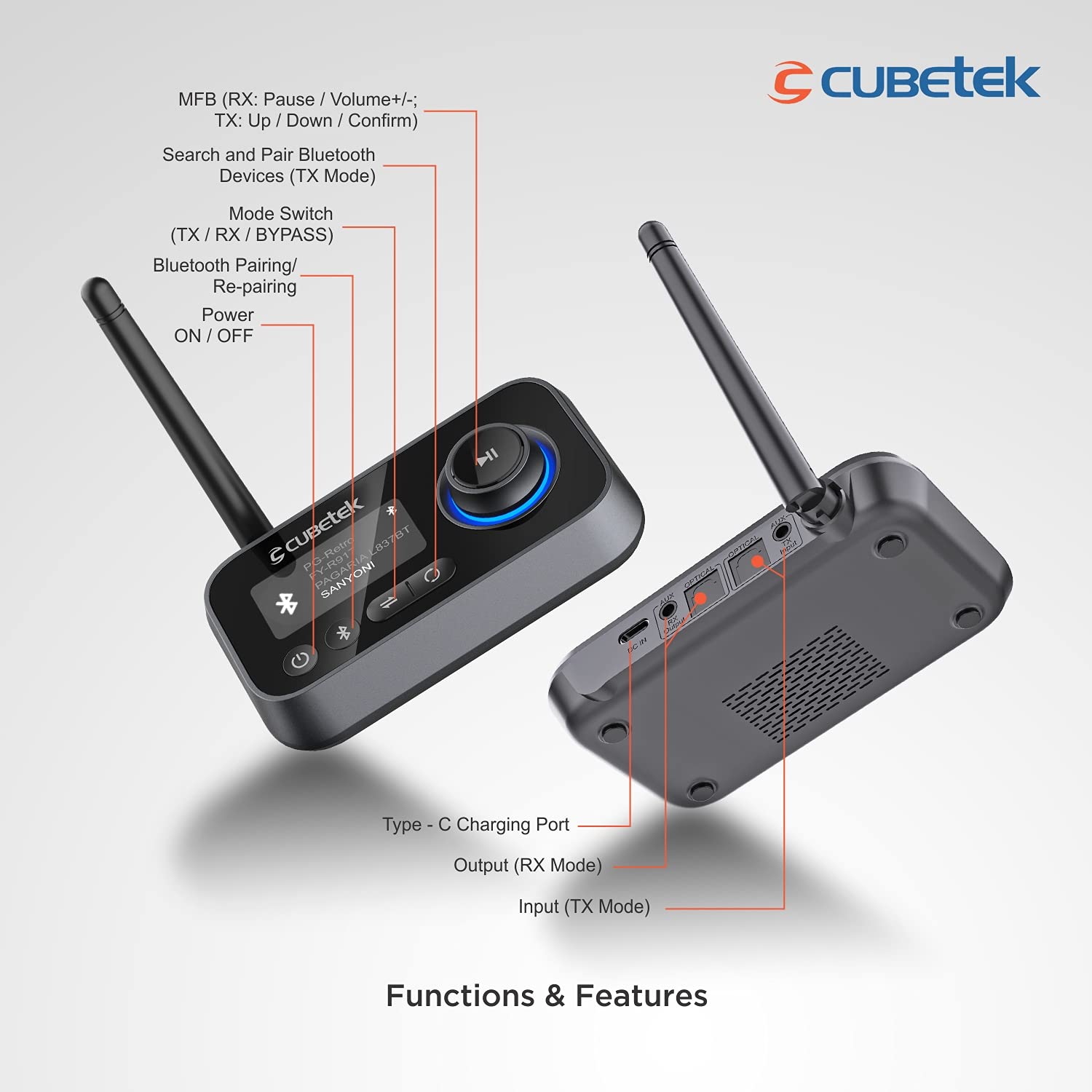
Cubetek CB-BT27 3-in-1 Bluetooth Transmitter Receiver V5.0 LCD Bypass Audio Adapter Dual Link
₦36,500.00
Description
About the Product 🔑
| 🔹 3 IN 1 V5.0 BLUETOOTH AUDIO ADAPTER | TX, RX, and Bypass modes 🔊 |
| 🔹 TX Mode | Transmits audio to headphones/speakers 🎧 |
| 🔹 RX Mode | Receives audio from cellphone to stereos 📱 |
| 🔹 Bypass Mode | Connects audio source directly to speakers 🔊 |
| 🔹 Model | CB-BT27 🏷️ |
| 🔹 LCD Display | Shows nearby devices 🖥️ |
| 🔹 Volume Knob | Controls volume and selects devices 🎚️ |
| 🔹 Connections | Optical, 3.5mm Aux, RCA cables included 🔌 |
| 🔹 Bluetooth Version | V5.0 for broad compatibility ✨ |
Key Features 🔑
| ✨ 3 IN 1 V5.0 BLUETOOTH AUDIO ADAPTER | TX, RX, and Bypass modes 🔊 |
| ✨ TX Mode | Transmits audio from your TV / computer to your Bluetooth headphones / speakers 🎧 |
| ✨ RX Mode | Receives audio from your cellphone to home stereos 📱 |
| ✨ Bypass Function | Connects between audio source and receiver directly ↔️ |
| ✨ No Battery, USB Powered | Always On, no battery worries ⚡ |
| ✨ 1.8” LCD Display | Shows nearby devices, making pairing easy 🖥️ |
| ✨ Volume Knob | Easy control for volume and device selection 🎚️ |
| ✨ Multi Connection | Connect by AUX 3.5mm, Optical, RCA Port 🔌 |
| ✨ Bluetooth V5.0 | Latest Actions IC supporting V5.0 for compatibility 📶 |
| ✨ Pair 2 Devices Simultaneously | Connect 2 Bluetooth Speakers / Earphones at one time 👯 |
| ✨ Easy Search and Pairs Up to 2 Devices | With LCD display, pairs easily with up to 2 devices 🔍 |
| ✨ Multiple Connectivity Options | Connect by Aux, RCA, Optical Ports with all cables in package 🔗 |
Usage Instruction 🛠️
TX Mode:
- Step 1: 🔌 Connect the adapter to a USB power source.
- Step 2: ⚙️ Switch the mode to TX.
- Step 3: 🎶 Connect the adapter to your TV/computer using Aux, Optical, or RCA cables.
- Step 4: 🎧 Turn on your Bluetooth headphones/speakers and put them in pairing mode.
- Step 5: 📶 The adapter will search and connect to your devices.
RX Mode:
- Step 1: 🔌 Connect the adapter to a USB power source.
- Step 2: ⚙️ Switch the mode to RX.
- Step 3: 🎶 Connect the adapter to your home stereo using Aux, Optical, or RCA cables.
- Step 4: 📱 Turn on Bluetooth on your cellphone and search for the adapter.
- Step 5: 🔗 Pair your cellphone with the adapter.
Bypass Mode:
- Step 1: 🔌 Connect the adapter to a USB power source.
- Step 2: ⚙️ Switch the mode to Bypass.
- Step 3: 🎶 Connect your audio source (e.g., TV) to the adapter’s input.
- Step 4: 🔊 Connect the adapter’s output to your speakers.
Product Specification 📱
| Bluetooth version ⚙️ | Actions V5.0 📶 |
| Bluetooth frequency 📡 | 2402-2480mHz |
| TX/RX distance 📏 | >10M (no object) |
| Audio technology 🎵 | SBC |
| Dual stream 👯 | Yes, can connect two devices at once |
| Interface: TX/RX 🔌 | Aux/OPT |
| Interface: Bypass 🔌 | Aux/OPT |
| Display size 🖥️ | 29*46*1.7MM |
| Microphone 🎤 | No |
| Battery 🔋 | No |
| Power interface ⚡ | Type-C 5V |
| Product size 📏 | 112.5*84*32.7mm |
| Product weight ⚖️ | 70.1g |
| Media type 🎶 | MP3, WAV, AAC |
| Country of Origin 🇨🇳 | China |
Product Details 🏷️
| Brand 🏷️ | CUBETEK |
| Manufacturer 🏭 | MELODY ELECTRONICS |
| Model 🏷️ | CB-BT27 |
| Model Name 🏷️ | CUBETEK BLUETOOTH TRANSMITTER RECEIVER |
| Product Dimensions 📏 | 11.25 x 8.4 x 3.27 cm; 120 g |
| Item model number 🏷️ | CB-BT27 |
| Hardware Interface 🔌 | Bluetooth, USB |
| Compatible Devices 💻 | Laptop, Television, Personal Computer, Headphone, Smartphone, Speaker |
| Special Features ✨ | No Battery, Volume Control, Built-in-Bluetooth, Multifunction, Compact Design, Digital Display Screen |
| Mounting Hardware 📦 | User Manual, RCA Cable, Bluetooth Audio Transmitter Receiver, Type-C Power Cable, Optical Cable, Aux Cable |
| Standing screen display size 🖥️ | 1.7 Millimetres |
| Audio input compatible 🔊 | RCA |
| Audio output mode 🎶 | Stereo |
| Audio Output Type 🎧 | Headphone |
| Voltage ⚡ | 5 Volts |
| Power Source 🔌 | Corded Electric |
| Batteries Included 🚫 | No |
| Batteries Required 🚫 | No |
| Wireless Type 📶 | Bluetooth |
| Connector Type 🔌 | Bluetooth |
| Compatible media type 🎶 | Bluetooth V5.0 |
| Device interface – primary 🔘 | Buttons |
| Material 🧱 | Plastic, Acrylonitrile Butadiene Styrene (ABS) |
| Media type 🎶 | MP3, WAV, AAC |
| Includes Rechargeable Battery 🚫 | No |
| Includes remote 🚫 | No |
| Supports Bluetooth Technology ✅ | Yes |
| ASIN 🏷️ | B0978V2CP6 |
| Customer Reviews ⭐ | 4.0 out of 5 stars (1,821 ratings) |
| Best Sellers Rank 🏆 | #3,447 in Electronics, #3 in Wireless Audio Receivers & Adapters |
| Date First Available 🗓️ | 21 June 2021 |
| Packer 📦 | MELODY ELECTRONICS |
| Importer 🏭 | MELODY ELECTRONICS |
| Item Dimensions LxWxH 📏 | 11.2 x 8.4 x 3.3 Centimeters |
| Generic Name 🏷️ | Bluetooth Audio Transmitter Receiver |
Full Images
Product Standout Benefits
3 IN 1 V5.0 BLUETOOTH AUDIO ADAPTER
It has 3 modes (TX, RX and Bypass). TX transmits audio from your TV / computer to your Bluetooth headphones / speakers; RX mode for receiving Audio from your cellphone to home Stereos; Bypass mode can connect Tv / computer to speakers directly. In this way, you will be able to get rid of wires and enjoy high quality wireless audio freely in your home.
LCD DISPLAY & VOLUME CONTROL KNOB
First one of its kind Bluetooth Transmitter to Display nearby Available devices, thus making pairing easy and help connect to desired devices. Also with Volume Control knob you can easily control the audio directly from the Transmitter.
- Displays upto 8 Nearby devices.
- Note: It cannot amplify the existing audio, but only control it.
FLEXIBLE CONNECTIONS (OPTICAL + 3.5mm AUX + RCA)
Beside 3.5mm Aux/RCA connection, the audio Bluetooth transmitter for TV plus Bluetooth receiver for TV edge ahead by also supporting TOSLINK optical cable input and output so your TV with optical sound output can feed the adapter, and your audio system can also wireless connect with the Bluetooth Adapter for home stereo.
CONNECT 2 DEVICES SIMULTANEOUSLY
Two Bluetooth headphones or speakers can pair at once so children can watch in silence and give parents a much needed break.
ALWAYS ON
No need to Charge, as device does not come with any battery. Instead keep it powered and enjoy hassle free transmission of audio from the device.
BLUETOOTH TRANSMITTER FOR TV
Easily transmit audio from TV to Bluetooth Headphones or Bluetooth Speakers. You can pair 2 devices at one time, and listen TV audio directly to your Bluetooth Audio system.
Customer Questions and Answers
Q: How do I use this product?
A: This 3 in 1 Bluetooth Audio Adapter has three modes: TX, RX, and Bypass. In TX mode, transmit audio from your TV or computer to your Bluetooth headphones or speakers. In RX mode, receive audio from your cellphone to your home stereos. Bypass mode allows you to connect your TV or computer directly to speakers, getting rid of wires for high-quality wireless audio throughout your home.
Q: Is it good for listening to TV audio?
A: Absolutely! This is a great Bluetooth transmitter for TV, easily transmitting audio from your TV to Bluetooth headphones or Bluetooth speakers. You can even pair two devices at once, so everyone can listen comfortably, or children can watch in silence.
Q: How do I connect it to my audio system?
A: It offers flexible connections! Besides the standard 3.5mm Aux/RCA, it also supports TOSLINK optical cable input and output. This means your TV with an optical sound output can feed the adapter, and your audio system can wirelessly connect with the Bluetooth Adapter for your home stereo.
Q: Can I control the volume directly from the device?
A: Yes, it features a Volume Control knob that allows you to easily control the audio directly from the transmitter. Please note that it controls the existing audio volume and does not amplify it.
Q: What devices can it connect to?
A: This adapter is compatible with a wide range of devices, including headphones, laptops, personal computers, smartphones, speakers, and televisions. It displays up to 8 nearby devices, making pairing easy.
Q: Does it need to be charged?
A: No, it does not come with a battery and does not need to be charged. You can keep it powered continuously for hassle-free, always-on audio transmission.
Buyer’s Guide
Step 1: 📦 Review the Features & Benefits
Check out the key features like the 3-in-1 modes (TX, RX, Bypass), LCD display, and volume control knob to make sure it’s exactly what you need for your home audio setup.
Step 2: 📝 Read the FAQs
Go through the FAQs for any last-minute questions about how the product works, its connection options (Optical, Aux, RCA), and how to connect multiple devices.
Step 3: 🎨 Choose Your Connection Method
Decide if you’ll be using the 3.5mm Aux, RCA cables, or the Optical cable for your audio transmission needs. The adapter supports all of these.
Step 4: 🛒 Add to Cart & Checkout
Add the CUBETEK Bluetooth Audio Adapter to your cart and proceed with the simple checkout process. Ensure you have a USB power source readily available.
Step 5: 📦 Upon Delivery
Verify it’s the correct product, check for any visible damage, and ensure all the included mounting hardware (Aux Cable, Bluetooth Audio Transmitter Receiver, Optical Cable, RCA Cable, Type-C Power Cable, User Manual) are present.
Step 6: 🛠️ Consider Complementary Products
Think about pairing it with Bluetooth headphones or speakers for a complete wireless experience. If you’re using it with a TV, ensure your TV has a suitable audio output (Aux, RCA, or Optical).
Related Products
-
ZdalaMit Bluetooth Voice Remote for Samsung Smart 4K UHD OLED QLED TVs with Hot Keys
₦36,500.00 -

ABoolon P6 1000 4K Compatible Outdoor Wifi 6 Bluetooth Projector 500″ Display 6D Keystone
₦36,500.00 -
Sale!

Beetel F1K Quad Band 2G GSM Phone White 500 Contact Capacity 2-Way Speakers LCD Display
Original price was: ₦52,785.00.₦52,670.00Current price is: ₦52,670.00. -

Cubetek Bluetooth 5.0 Audio Transmitter Adapter Optical TOSLINK 3.5mm Aux for TV PC PSP PlayStation aptX LL
₦36,500.00 -

Premium 4K DisplayPort to HDMI Adapter 20-Pack Braided Uni-Directional Fast Delivery
₦210,000.00 -

Store2508 32-55 Inch LCD LED TV Wall Mount 6-Way Swivel Tilt
₦36,500.00 -

Samsung 32 Inch Android LED TV Main Board – Tested & Working
₦36,500.00 -
Sale!

J&D 2 x 6.35mm to 2 RCA Gold-Plated Heavy Duty Copper Shell Stereo Audio Adapter Cable 6 Feet
Original price was: ₦58,225.00.₦51,600.00Current price is: ₦51,600.00. -

ZdalaMit Universal Replacement Remote for Sony Bravia Smart TV LCD LED UHD OLED 4K Android Televison, Hot Keys, Pre-programmed
₦36,500.00 -
Portronics SoundDrum 1 12W TWS Portable Bluetooth Speaker Blue with 360° Sound and Type C Fast Charging
₦36,500.00 -
Sale!

50ft HDMI Cable 1.4, 1080p, Ethernet, 3D Blu-ray/DVD/TV, PS3/Xbox HDTV LCD/LED Ready
Original price was: ₦157,950.00.₦80,188.08Current price is: ₦80,188.08. -

AMAIRIYCA Universal Remote Control for LG Smart TV, Black, Compatible with All Models
₦36,500.00 -

marman® Original LG AKB75855501 AN-MR20GA Smart TV Magic Remote Control UHD OLED QLED Bluetooth Voice Command
₦36,500.00 -
4K@60Hz Lightning to HDMI Adapter for iPhone and iPad with Fast Charging Port
₦36,500.00 -

TKE Replacement Voice Remote for Samsung Smart 4K NEO QLED OLED TVs BN59-01385A Disney+ Netflix Plus HOT Keys (No Solar Charging)
₦36,500.00 -

LG MR22GA Magic Remote Voice Pointer Replacement for LG Smart TV AKB76039908
₦36,500.00 -

rts 10 Meter High-Speed 3D 4K HDMI 2.0 Cable for HD TV, Monitor, Gaming
₦36,500.00 -

7SEVEN Bluetooth Voice Command Remote for Sony Bravia Smart 4K UHD OLED QLED Android TVs.
₦36,500.00 -

Voltonix MR22GA Replacement LG Magic Remote with Pointer and Voice Control
₦36,500.00 -

Upix Voice Smart TV Remote Control AKB76039908 for LG LCD LED MR22GA Pointer Hotkeys
₦36,500.00
Reviews
There are no reviews yet.