



7SEVEN Air Fly Mouse Universal Remote with Keyboard, IR Learning for Smart Devices
₦16,887.00
Description
### 🏷️ About the Product
| ✨ Versatile and convenient solution | 🚀 Seamlessly supports a wide range of devices |
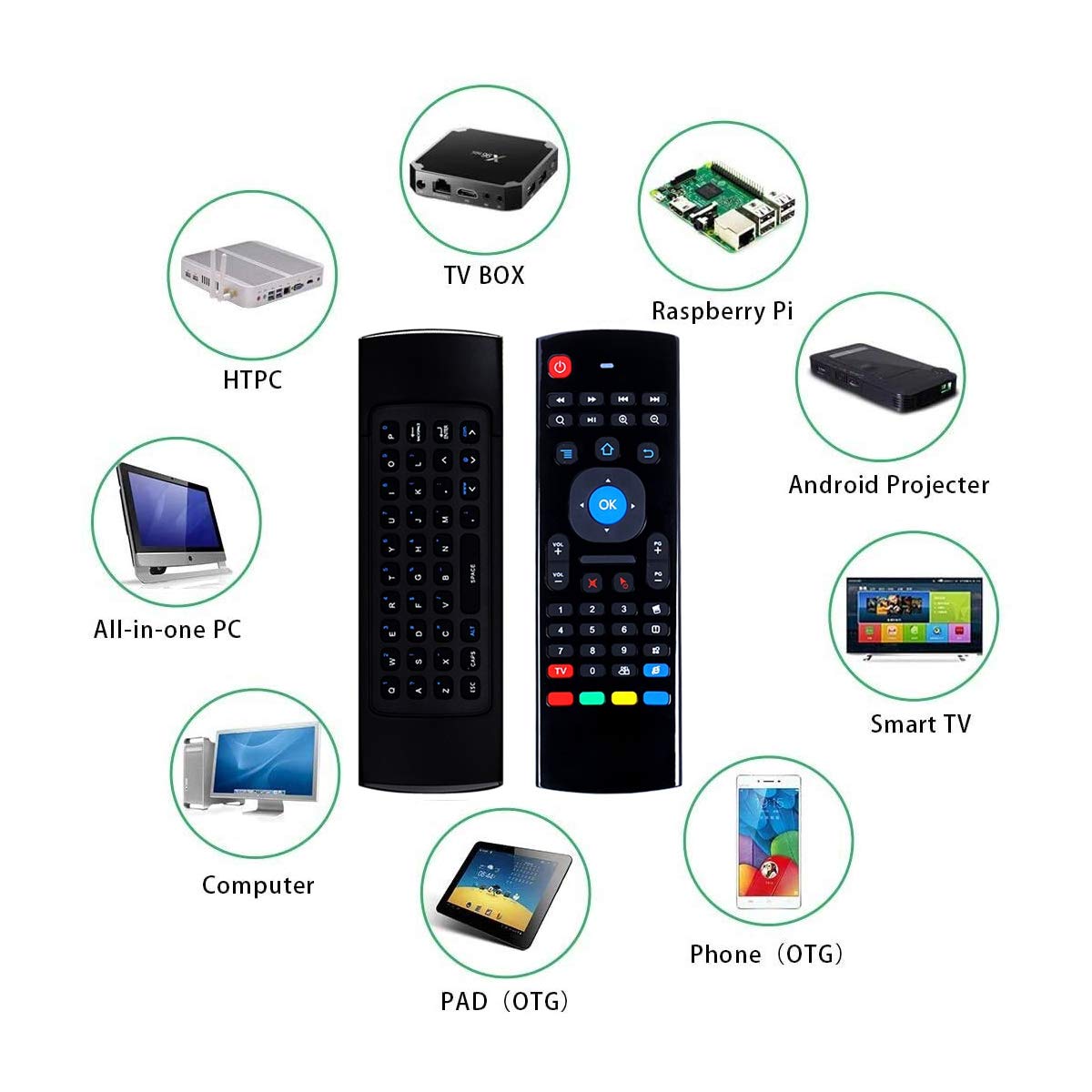
| ✅ Compatible with Android TV Boxes, Smart TVs, network media players, game consoles, PCs, tablets, HTPCs, and PCTVs | 💡 Enhances your control experience across various platforms |
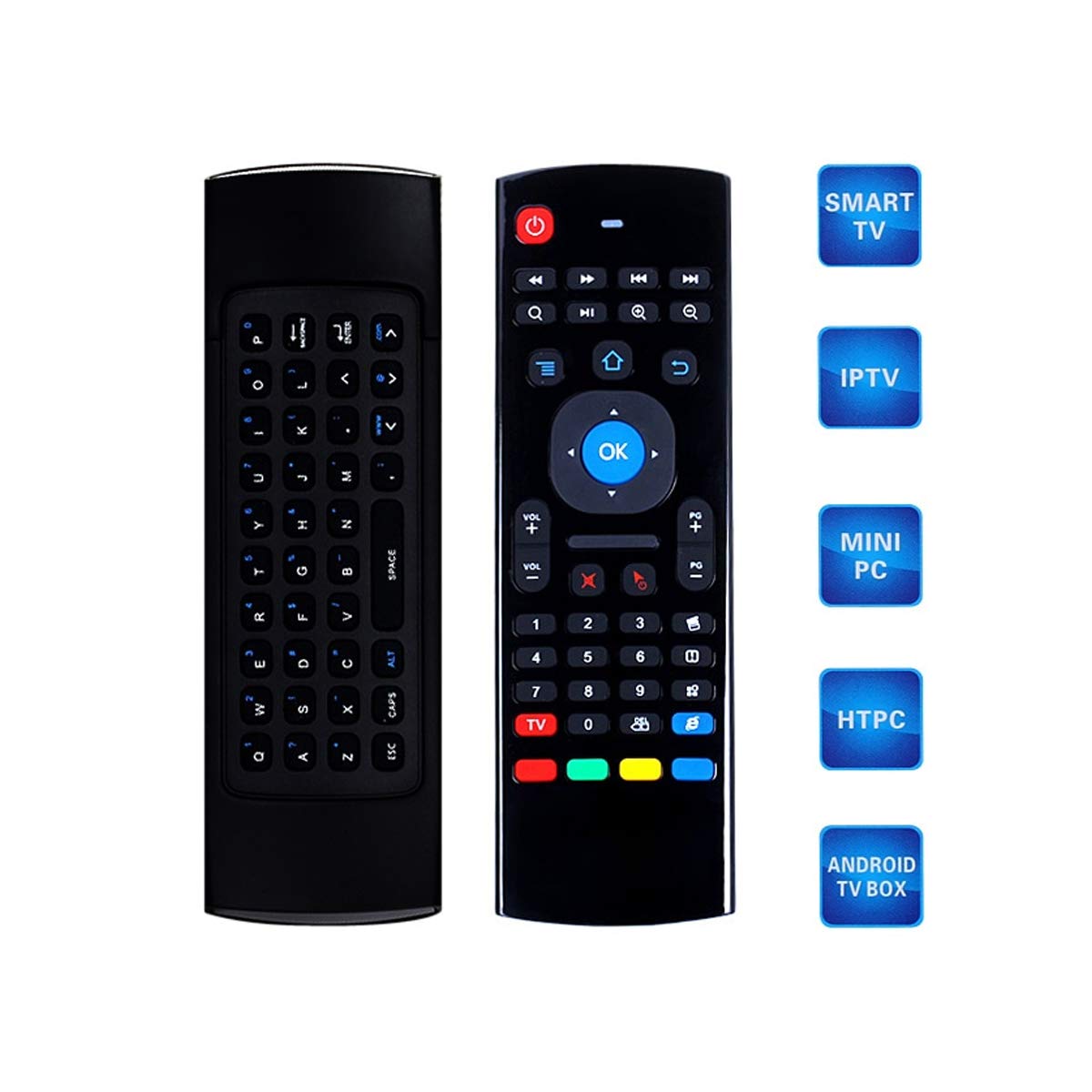
| ⭐ All-in-one remote | 🎛️ Ergonomic design incorporates a keyboard |
| ⌨️ Offers additional functionality for effortless text input and navigation | 🎯 Ideal for navigating Smart TV apps, playing games, or browsing on PC |
| ✅ Unified and user-friendly solution | 🌟 Innovative dual-sided design |
| 💡 Combines air mouse and keyboard functionalities | 🚀 Intuitive pointing and efficient text input |
| ✅ Streamlines control into a single, intuitive remote | ⭐ Incorporates IR Learning for seamless integration |
| 🗣️ Google Assistant adds voice-activated capabilities | 🌐 Enables hands-free commands and expands interactive control |
| 🧭 Built-in Gyroscope ensures precise navigation | 🎮 Ideal for gaming and motion-sensitive applications |
| ✅ User-friendly design and advanced features | 🔗 Provides a seamless and interactive experience |
| 🌐 Cross-platform compatibility | 💻 Supports Android, Windows, Mac OS, and Linux operating systems |
| ✅ Works effortlessly across different operating systems | 👍 Ideal accessory for those seeking a universal control solution |


### 🛠️ Usage Instruction
- IR Learning: Keep IR emitters of TV remote and air mouse aligned.
- Press and hold the TV key on the air mouse; the red LED will flash quickly, then stop and flash slowly. The air mouse entered IR learning mode.
- Press the TV key on the TV remote while the air mouse red LED is flashing slowly; the air mouse has received the code value.
- Press the key of the air mouse to learn; the red LED light flashes slowly, indicating successful learning.
- Press the TV key on the air mouse to save and exit learning mode; the red light turns off.
- Repeat for other keys as needed.
Multifunctional Air Remote Mouse:
- 2.4G wireless keyboard and mouse combo.
- 6-axis somatosensory and infrared remote control.
- 3-Gyro + 3-Gsensor for convenient operation in horizontal and vertical modes for gaming and typing.
- Can learn up to 5 IR remote keys.
Widely Used System Compatibility:
- Supports Android TV Box, Smart TV, Network Media Player, Game Player, PC, Tablet, HTPC, PCTV, and more.
- Supports Windows, macOS, Android, and Linux operating systems.
- Compatible with any device with a USB port.
- Note: On some incompatible TVs, switching on may not be possible.
How to Use:
- Insert enclosed dongle into your device’s USB port.
- Pairing will be completed once you can see and move the mouse cursor on the screen.
- If pairing was unsuccessful, press the OK key and TV key at the same time.
### 📱 Product Specification
| Brand 🚀 | 7 SEVEN |
| Manufacturer 🏭 | 7SEVEN |
| Model Name 💡 | air fly mouse remote |
| Product Dimensions 📏 | 18 x 5 x 3 cm; 100 g |
| Batteries 🔋 | 2 AAA batteries required |
| Hardware Platform 💻 | Television |
| Compatible Devices 🔌 | Projector, Laptop, Television, Set Top Box, Streaming Device, Computer, Tablet, Home Theater |
| Special Features ⭐ | Voice Search 🗣️ |
| Display Technology 🌟 | LED |
| Battery Description 💡 | Alkaline |
| Batteries Included ❌ | No |
| Batteries Required ✅ | Yes |
| Connector Type 🔌 | Wireless, USB, Infrared |
| Material 🧱 | ABS |
| Form Factor 📱 | Remote Control |
| Includes Rechargeable Battery ❌ | No |
| Country of Origin 🇨🇳 | China |
| Item Weight ⚖️ | 100 g |
### ℹ️ Product Details
| ASIN 🏷️ | B08XK323T8 |
| Best Sellers Rank 🥇 | #14,733 in Electronics, #88 in Keyboard & Mouse Sets |
| Date First Available 🗓️ | 25 February 2021 |
| Packer 📦 | Sevenxt Electronics Private Limited, 181/1 80/1 Swamy Naicken Street, Chintadripet, Chennai-600002, Contact: +91 9840129077, contact.sevenxt@gmail.com |
| Importer 🏭 | Sevenxt Electronics Private Limited, 181/1 80/1 Swamy Naicken Street, Chintadripet, Chennai-600002, Contact: +91 9840129077, contact.sevenxt@gmail.com |
| Item Dimensions LxWxH 📏 | 18 x 5 x 3 Centimeters |
| Net Quantity 🔢 | 1.00 Count |
| Generic Name 🏷️ | air mouse remote control |
Full Images
Product Standout Benefits
This multifunctional air remote mouse offers a seamless and versatile control experience for your various devices.
IR Learning Capability
Enjoy the convenience of learning up to 5 keys from your TV’s IR remote, including the Power key and four color keys. This feature allows for easier operation of your Android Smart TV Box by consolidating multiple remotes into one.
- How to Learn:
- Align the IR emitters of your TV remote and the air mouse.
- Press and hold the ‘TV’ key on the air mouse until the red LED flashes quickly and then slows down, indicating it has entered IR learning mode.
- Press the desired key on your TV remote.
- Press the key on the air mouse you want to learn, and the red LED will flash slowly, confirming successful learning.
- Press the ‘TV’ key on the air mouse to save and exit learning mode.
- Note: Your TV remote must support the NEC protocol for learning to function correctly.
Multifunctional Air Remote Mouse
Experience the best of both worlds with a 2.4G wireless keyboard and mouse combo enhanced by 6-axis somatosensory and infrared remote control.
- Equipped with 3-Gyro and 3-Gsensor, it offers more convenient operation in both horizontal and vertical modes, perfect for gaming and typing.
- Can learn up to 5 different remotes from your TV IR remote.
Widely Used System Compatibility
This device is designed to work with a broad range of systems and devices, ensuring flexibility and ease of use.
- Supports Android TV Box, Smart TV, Network Media Player, Game Player, PC, Tablet, HTPC, PCTV, and more.
- Compatible with Windows, macOS, Android, and Linux operating systems.
- Works with any device featuring a USB port, including PC, TV, set-top boxes, game players, and media players.
Please note: On some incompatible TVs, the power-on function may not be supported.
Customer Questions and Answers
Q: How do I set up this air remote mouse? 🤔
A: It’s super easy! Just pop the included dongle into your device’s USB port. Once you see and can move the mouse cursor on your screen, you’re all paired up. If for some reason it doesn’t connect right away, just press the ‘OK’ and ‘TV’ keys at the same time, and you should be good to go! ✨
Q: Can I use this with my smart TV? 🌿
A: Absolutely! This remote is a real all-rounder. It’s made to work with Android TV Boxes, Smart TVs, Network Media Players, Game Players, PCs, Tablets, HTPCs, and PCTVs. Plus, it plays nicely with Windows, macOS, Android, and Linux. So yeah, if your device has a USB port, chances are this remote will work with it! 💻📺
Q: How does the IR learning feature work? 💡
A: So, you can actually teach this little guy to control up to 5 buttons from your TV’s original remote – like the power button or those handy color buttons. You just need to line up the IR emitters on both remotes, press and hold a button on the air mouse to put it in learning mode, then press the button you want to copy on your TV remote. After that, press the button on the air mouse where you want to save it, and boom, it’s learned! Just remember, your TV remote needs to use the NEC protocol for this to work. 🌟
Q: What kind of batteries does it take? 🔋
A: This remote runs on 2 AAA batteries. They aren’t included in the box, so you’ll need to grab those separately. 💡
Q: Is it good for gaming? 🎮
A: Oh yeah, it’s great for gaming! It’s got this cool 6-axis somatosensory thing with 3-Gyro and 3-Gsensor, which makes it super convenient to control your games whether you’re holding it upright or sideways. 🔥
Related Products
-
Sale!
AYAME Voice Command Compatible Sony RMF-TX520p Bravia Smart 4K TV Remote Replacement
Original price was: ₦34,500.00.₦17,985.00Current price is: ₦17,985.00. -

ZdalaMit Universal Replacement Remote for Samsung Smart Hub TVs LCD LED OLED QLED UHD HD 3D
₦36,500.00 -

HITORE Replacement Remote for Sony Bravia Smart 4K UHD TVs – Compatible with LCD, LED, OLED, QLED
₦15,587.00 -

RAVIAD LED Smart TV Remote Control Black for Redmi Smart Fire TV Netflix Prime Video
₦25,987.00 -

RAVIAD Replacement Remote for Onida Smart TVs 4K UHD LCD LED OLED QLED – No Voice, with YouTube, Prime Video, Netflix Hot Keys
₦25,987.00 -

Original LG Magic Remote for All LED TVs with Netflix Prime Buttons
₦19,487.00 -

Samsung Smart TV Remote Control for LED OLED QLED 4K 8K HDR 3D TVs with Netflix Prime Video WWW Buttons
₦36,500.00 -

Tu-DOX Zdalamit Non-Voice Bluetooth Replacement Mi TV Remote for Xiaomi Redmi Android Smart TVs
₦36,500.00 -

Gvirtue AKB75095307 Replacement Remote for LG TV Models 32LJ550B 55LJ5500 55UJ6050 43UJ6200 and more.
₦19,487.00 -
LRIPL 7-in-1 Universal Smart TV Remote for OnePlus, Nokia, Thomson, Kodak, Lloyd, TCL, Acer
₦34,500.00 -
Sale!

Zoook Clicker WiFi Smart Universal Remote Black, Works with Alexa, Control AC, TV, DTH
Original price was: ₦34,500.00.₦26,085.00Current price is: ₦26,085.00. -
ZdalaMit Bluetooth Voice Remote for Samsung Smart 4K UHD OLED QLED TVs with Hot Keys
₦36,500.00 -

7SEVEN® Universal Smart TV Remote for LG QLED 4K UHD Android Google Televisions Non-Voice Command
₦34,500.00 -
Sale!

AUSHA Smart Universal Air Mouse with IR Learning Keyboard for Android Projector TV Box Gaming Boxes
Original price was: ₦37,000.00.₦16,470.00Current price is: ₦16,470.00. -

LG Smart TV Universal Remote Control for All 3D 4K WebOS Models
₦5,999.00 -

MUMAX Universal Smart TV Remote Black for All LG Models (No Voice Pointer)
₦24,687.00 -

7SEVEN Bluetooth Voice Command Remote for Sony Bravia Smart 4K UHD OLED QLED Android TVs.
₦36,500.00 -
Smart Hub Compatible Universal TV Remote for QLED OLED UHD LED LCD Plasma HD 3D TVs with Netflix Prime
₦20,787.00 -

Marman Bluetooth Voice Command Remote Control for Xiaomi Mi TV 4K UHD HD LED Smart Android Redmi Television
₦19,487.00 -

RAVIAD Black Replacement Remote Control for LG Smart TVs OLED LED LCD UHD Plasma Android
₦25,987.00
Reviews
There are no reviews yet.