
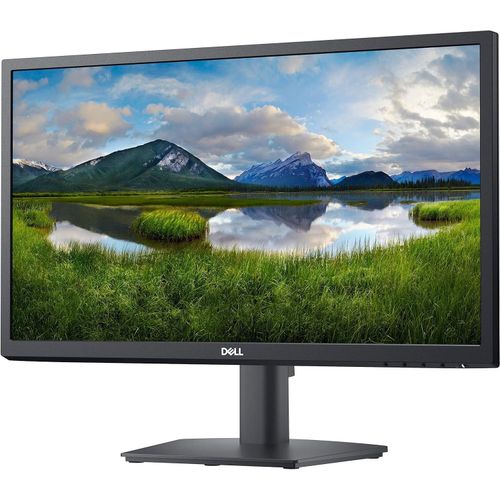
E2222H 21.5 Inch Black Full HD Computer Monitor
₦230,300.00
The essentials you need to be more productive Wide viewing angle: See your work in superb FHD clarity and get consistent views across a wide 178°/178° viewing angle.Easy on the eyes: Enjoy a flicker-free screen with ComfortView, a software feature that reduces harmful blue light emissions. It’s designed to optimize eye comfort even over an extended
Description
About the Product 🔑
| Feature 🌟 | Description 📝 |
|---|---|
| Display Size 📏 | 21.5 inch FHD 🖥️ |
| Design ✨ | Compact stand, slim profile, eco-conscious 🍃 |
| Viewing Angle 👁️ | Wide viewing angle 🔄 |
| Backlight Technology 💡 | LED backlight 🌈 |
| Refresh Rate ⚡ | 60 Hz 🚀 |
| Resolution 🖼️ | 1920×1080 Full HD ✅ |
| Screen Size 📏 | 21.5 screen size 🖥️ |
| Productivity 📈 | Reduces blurring for maximum productivity 💯 |
| Budget Gamer Option 🎮 | Affordable with solid performance 💰 |
| Eye Comfort 👀 | Flicker-free screen with ComfortView reducing blue light 💙 |
| Connectivity 🔌 | VGA and DP ports 🔗 |
| Cable Management 🧹 | Improved cable management hides cables 〰️ |
| Bezel 🖼️ | Slim bezel adds modern look 😎 |
| Mounting ⚙️ | VESA-compatible mounts and stands 🔧 |
| Dell Display Manager 💻 | Easy Arrange for multitasking and auto-restore feature 🔄 |
| Environmental Standards 🌍 | Meets EnergyStar®, EPEAT® Gold, TCO Certified ♻️ |
| Packaging 📦 | Styrofoam-free, at least 75% recycled cardboard 🌿 |
| Energy Conservation 💡 | PowerNap dims or sleeps monitor when not in use 😴 |
Product Specification 📱
| Specification Name 🏷️ | Description 📝 |
|---|---|
| Display Type 🖥️ | LCD Panel with LED backlight 💡 |
| Diagonal Viewable Area 📏 | 54.48 cm (21.45 in.) 🔄 |
| Resolution Support 🖼️ | 1920 x 1080, full-screen for lower resolutions ✅ |
| Connectivity 🔌 | VGA, DP ports 🔗 |
| Ergonomics ⚙️ | Flicker-free screen, ComfortView 💙 |
| Energy Standards 🌍 | EnergyStar®, EPEAT® Gold, TCO Certified ♻️ |
| Power Saving 💡 | PowerNap feature 😴 |
Usage Instruction 🛠️
- Step 1: 🔌 Connect the monitor to your computer using the VGA or DP port.
- Step 2: 💡 Turn on the monitor by pressing the power button.
- Step 3: ⚙️ Adjust display settings using the buttons on the monitor or through Dell Display Manager.
- Step 4: 🍃 Ensure proper ventilation and cable management for optimal use.
Product Benefits 💡
- Enjoy superb FHD clarity with consistent views across a wide 178°/178° viewing angle.
- Experience optimized eye comfort with a flicker-free screen and ComfortView reducing harmful blue light emissions.
- Maximize your desktop space with a compact stand and improved cable management.
- Personalize your workspace with VESA-compatible mounts and stands.
- Achieve improved multitasking abilities with Easy Arrange in Dell Display Manager, offering pre-set window partitions.
- Save time with the auto-restore feature that remembers application locations and convenient shortcut keys.
- Benefit from IT managers easily capturing and tracking monitor information through asset management reports.
- Meet the latest regulatory and environmental standards, reducing manufacturing impact on the environment.
- Save energy when your monitor is not in use with the PowerNap feature.
Product Details 🏷️
- Dell 22 inch FHD monitor has a compact stand, slim profile and eco-conscious design.
- Get a wide viewing angle while saving desk space.
- LED backlight technology offers visual brilliance with maximum efficiency 60 Hz standard refresh rate reduces deterioration caused by blurring to ensure maximum productivity.
- 21.5 screen size with 1920×1080 resolution provides a native display of a Full HD video sources without any degradation due to down sampling technologies viewable screen size showcases movies games and photos with …
- The Dell E2222H flat panel monitor has an active matrix, Thin-Film Transistor (TFT), Liquid Crystal Display (LCD) Panel with LED backlight.
- The monitor features include : • 54.48 cm (21.45 in.) diagonal viewable area display (measured diagonally).
- 1920 x 1080 resolution, with full-screen support for lower resolutions.
- View and Download Dell E2222H user manual online.
- E2222H monitor pdf manual download.
- Also for: E2222ht, E2222hf.
- Manual Dell E2222H.
- View the Dell E2222H manual for free or ask your question to other Dell E2222H owners.
- Wide viewing angle: See your work in superb FHD clarity and get consistent views across a wide 178°/178° viewing angle.
- Easy on the eyes: Enjoy a flicker-free screen with ComfortView, a software feature that reduces harmful blue light emissions.
- It’s designed to optimize eye comfort even over an extended period of time.
- Functional, space-saving design.
- Convenient connectivity: Connect to current and legacy systems via VGA and DP ports.
- Maximize your desktop: Cut clutter with space-saving features like a compact stand and improved cable management that hides cables while complementing any workspace.
- Clean, simple design: A slim bezel adds a modern look.
- Adapts to your needs: Make your workspace your own with VESA-compatible mounts and stands.
- Dell Display Manager.
- Productive at every level: Easy Arrange allows you to easily tile multiple applications across one or more screens with 38 pre-set window partitions and the ability to personalize up to five windows, giving you improved multitasking abilities.
- Seamless transitions: The auto-restore feature remembers where you left off, so applications will go back to where you left them, even after you’ve unplugged.
- The key to convenience: Shortcut keys can save you even more time, letting you easily configure your display management settings so you can get to work faster.
- More ways to manage: Asset management reports allow IT managers to quickly capture and track monitor information as well as configure multiple monitors at once through a single setup.
- Green thinking for today and tomorrow.
- Environmental standards: This monitor meets the latest regulatory and environmental standards such as EnergyStar®, EPEAT® Goldand TCO Certified.
- Eco-conscious packaging: To reduce our manufacturing impact on the environment, this monitor is shipped Styrofoam-free and the packaging is made of at least 75% recycled cardboard.
- Energy conservation: Save energy when your monitor is not in use with PowerNap, a feature that dims or puts your monitor to sleep when it’s not in use.
- Advancing sustainability: Dell Technologies is committed to reducing environmental impact throughout the product lifecycle.
- Read more about our commitment to sustainability and our 2030 Social Impact goals here, and our product’s carbon footprint here.
Full Images


Product Standout Benefits
This monitor is designed to make your workspace more organized and efficient.
- Space-Saving Design: Connect to current and legacy systems with VGA and DP ports. You can cut the clutter with a compact stand and improved cable management that hides cables while complementing any workspace.
- Shortcut Keys: Save even more time with shortcut keys that let you easily configure your display management settings so you can get to work faster.
- Energy Conservation: Save energy when your monitor is not in use with PowerNap, a feature that dims or puts your monitor to sleep when it’s not in use.
- Productive at Every Level: Easy Arrange allows you to easily tile multiple applications across one or more screens with 38 pre-set window partitions and the ability to personalize up to five windows.
- Environmental Standards: This monitor meets the latest regulatory and environmental standards, such as EnergyStar, EPEAT Gold, and TCO Certified.
Product Information
- Standing screen display size: 21.5 Inches
- Screen Resolution: 1920×1080
- Max Screen Resolution: 1920 x 1080
Customer Questions and Answers
Q: How can I make my workspace tidier? 🤔
A: You can cut the clutter with space-saving features like a compact stand and improved cable management that hides cables while complementing any workspace.
Q: How can I get to work faster? 🚀
A: Shortcut keys can save you even more time, letting you easily configure your display management settings so you can get to work faster.
Q: How does this monitor help save energy? 💡
A: Save energy when your monitor is not in use with PowerNap, a feature that dims or puts your monitor to sleep when it’s not in use.
Q: How can I arrange multiple applications easily? 🗂️
A: Easy Arrange allows you to easily tile multiple applications across one or more screens with 38 pre-set window partitions and the ability to personalize up to five windows.
Q: What environmental standards does this monitor meet? 🌍
A: This monitor meets the latest regulatory and environmental standards, such as EnergyStar, EPEAT Gold, and TCO Certified.
Related Products
-

23.8 Inch Full HD IPS 1ms GTG Gaming Monitor 24GN60R-B
₦333,300.00 -

P2725H 27 Inch Full HD 1920×1080 16:9 IPS LED 100Hz Monitor
₦333,634.14 -

55 Inch Samsung Odyssey Ark G97NC 4K UHD 165Hz Gaming Monitor LS55CG970NUXEN
₦3,453,634.00 -

V24 23.8 Inch Full HD 3 Edge HDMI VGA Monitor
₦230,800.74 -

57 Inch Odyssey Neo G9 G95NC Dual UHD 240Hz Curved Gaming Monitor
₦3,296,652.00 -

27 Inch Full HD 1080p LED Monitor
₦510,120.00 -

55-inch Curved 4K UHD Smart Gaming Monitor – Refurbished
₦3,453,634.00 -

P22 G5 21.5 Inch Full HD Black LCD Monitor 16:9 Aspect Ratio
₦243,300.00 -

57 Inch Odyssey Neo G9 G95NC Dual UHD Curved Gaming Monitor
₦3,296,652.00 -

C24-25 Full HD 23.8 Inch VA LCD Monitor Black
₦333,840.00 -

Omen 32 Inch QHD 165Hz Curved Gaming Monitor 2560×1440 3000:1 1ms GTG
₦875,840.00 -

V24 23.8 Inch Full HD 3-Edge Monitor with HDMI and VGA Connectivity
₦228,517.11 -

P24v G5 24 Inch Full HD 16:9 Black LCD Monitor
₦278,580.00 -

21.45 Inch Full HD Monitor AMD FreeSync™ Compatible
₦121,100.00 -

19-inch HD LED Solar Flat Screen TV Black with HDMI USB VGA Input
₦62,480.00 -

23.8 Inch IPS Full HD Monitor with AMD FreeSync Technology
₦319,600.00 -

19 Inch Black HD LED Solar Flat Screen TV with AC/DC, HDMI, USB, VGA
₦62,480.00 -

21.45 Inch Full HD Monitor with AMD FreeSync Technology
₦121,100.00 -

ASUS ZenScreen MB166CR 15.6 Inch FHD Portable USB-C Monitor
₦443,160.00 -

34 Inch 34WR55QK UltraWide QHD Curved Monitor with USB Type-C™ Connectivity
₦853,260.00